
Stock Journal — why the count is what it is
Every movement in and out with its reason: purchases, returns, damage, theft, opening stock — and the changes your CRM makes when it keeps one count with the website.
5 min readUpdated 21 Oct 2026
In this guide
Where it is
Stock Journal under Books & Tax in your sidebar. It has two views: By Product (everything that has had a movement, with its current count) and All Movements (the full list — when, which product, the reason, how many, and what it came from). This is different from the stock count you set on a product — for that, see Stock & inventory.
The journal is a record, not the count itself. The number your website sells from is the stock count on the product — that is the one the By Product view shows. Purchases and returns move both at once; an entry you add here is written into the journal for the record, and you change the count itself on the product.
What writes into it on its own
These write themselves as you work — you never type them:
| Movement | When it happens |
|---|---|
| Purchase received | You record a supplier bill with items linked to your catalogue and add it to stock |
| Customer return | A return or RTO you processed and put back into stock |
| Returned to vendor | You sent goods back to a supplier |
| Opening stock | You accept the one-tap prompt that turns the counts you already had into opening entries |
| CRM | Your CRM keeps one count with this website and a bill, a credit note, a stock move, a stock-take, goods received or an import there changes this product's count — the line says which (“Sold in your CRM · BIL/26-27/0042”, “Stock move in your CRM”) and who made it |
A CRM line shows only what really moved on this website: the website counts whole units, so half a kilo sold in the CRM writes a line only when the whole-unit count changes, and a product the website does not count (stock left blank) gets no line. When a product had no line here before, the first CRM line comes with an Opening stock line for the count it had (when it had any) — so its history starts from a real number. Switching on One count for both with your CRM's count writes the difference as an Adjustment (“Matched to the CRM when one count was switched on”).
Your website's own sales are not written into the journal today. An order takes the item off the product's stock count straight away — that part is exact — but it leaves no line here, so read the journal as the record of goods coming in, going back and being written off, not as a sales ledger. Your sales live on Orders and in Profit & Loss. (A bill made in your CRM does leave a line, when the CRM keeps one count with the website.)
What you record yourself
These are the movements no system can know about. Recording them is what keeps the count honest and explains itself later.
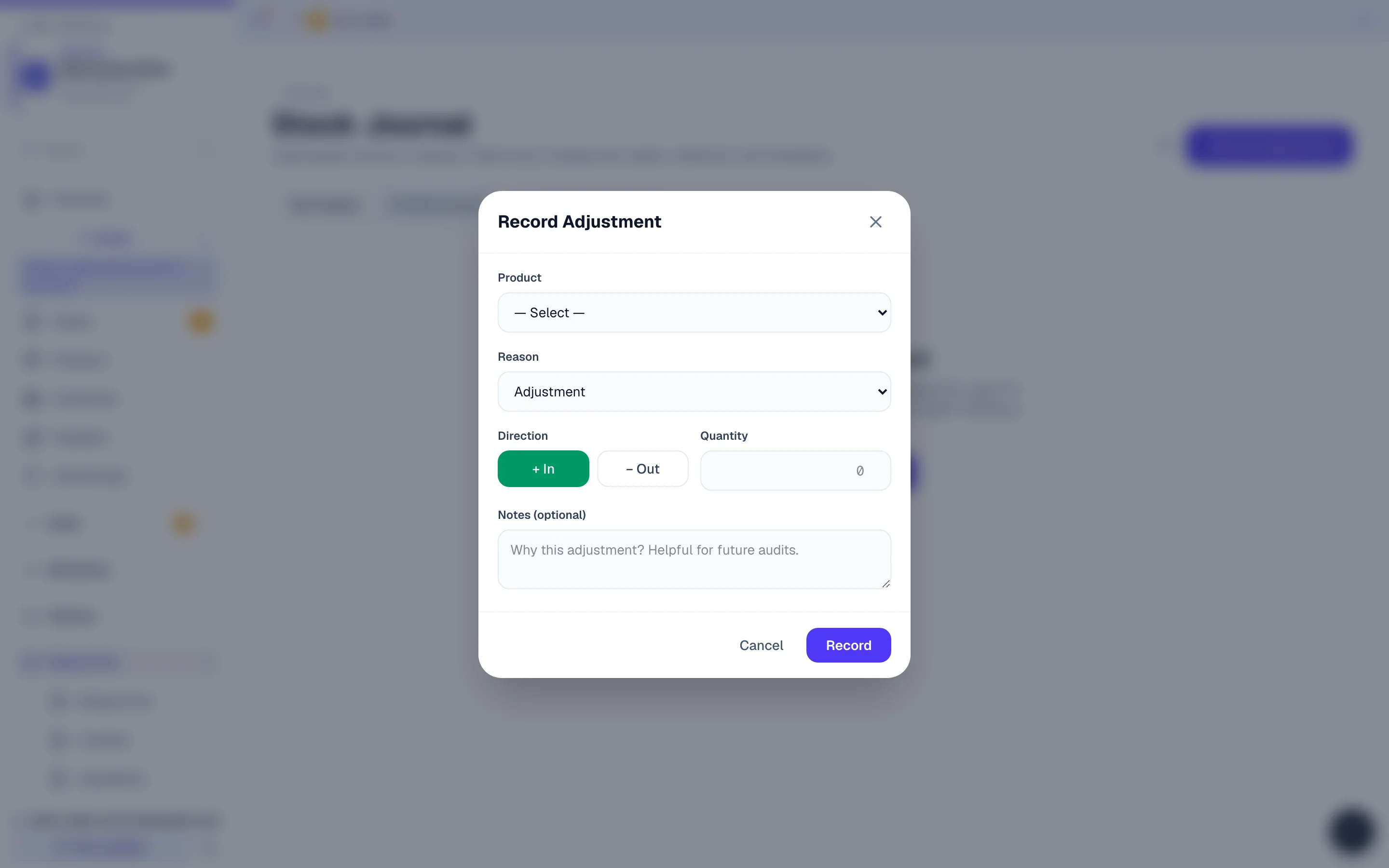
Press + Record Adjustment
Top right of the Stock Journal page — or Adjust on any row of the By Product list, which shows everything that has had a movement, newest first.
Pick the product, In or Out, and the reason
Enter how many, choose whether it came In or went Out, pick the reason — Adjustment, Opening stock, Damage, Theft / loss, Internal consumption or Manual — and, if you like, a short note, then Record. The reason is what you read back on All Movements. Your note is saved with the entry, but today the list shows notes only on lines your CRM wrote — so let the reason carry the story, and keep a paper note for anything longer.
Then set the count on the product
The entry is the record of what happened. The count your website sells from lives on the product, so change it there as well (Stock & inventory) — the journal is what explains that change to anyone who asks six months later.
When the shelf and the screen disagree
Work backwards through the journal. In practice it is nearly always one of four things:
| What you see | Usually means |
|---|---|
| Screen higher than the shelf | A counter or WhatsApp sale that was never recorded as an order — or an order you marked Cancelled after the goods had already gone out (cancelling puts the stock back; you can switch that off in Settings → Advanced → Inventory) |
| Screen lower than the shelf | Goods that arrived but were never added to stock — the supplier bill not entered, or entered with Add these items to my stock unticked and never added later |
| A jump with no movement behind it | Someone edited the count on the product directly without recording why |
| Steady drift on one product | Breakage or shop use nobody has been recording — start recording it |
Keeping it useful
Do this
- Record damage and loss the day it happens, with a note
- Use Opening stock when you start tracking something, not Adjustment
- Record counter sales as orders so the count comes down with the sale, not by itself
- Read the journal before correcting a count — the cause is worth more than the fix
Not this
- Editing the count on the product to “fix” a difference you have not explained
- Using Adjustment for everything — the reasons are what make the page readable
- Recording theft as damage to keep the numbers tidy
- Leaving a month of breakage to record in one go
Example · Anil, a sweet shop in Jaipur
His barfi count ran about four trays short every week and he assumed miscounting. The journal held nothing but his supplier deliveries — nobody had been recording the trays given as tasting samples at the counter. He started recording them as internal consumption; the drift had a name at last, and he found he was giving away about ₹3,000 of barfi a month, which was a business decision rather than a mystery.
Related
| You want to… | Read |
|---|---|
| Set and update stock counts | Stock & inventory |
| Record supplier bills that add stock | Purchases & vendor bills |
| Process returns so stock is handled right | Cancellations, returns & RTO |
| Download a valuation or reorder list | Reports & exports |
| See who changed what | Activity log |
Common questions
Do I have to use this page?
No. If you never have breakage and never take anything for your own use, the journal fills itself from purchases, returns and — when your CRM keeps one count with the website — every change made in the CRM, and you can simply read it.
Is this the same as the CRM's stock module?
No. This journal is your website's products — the things you sell. The CRM keeps its own stock record on each item. The two meet only for an item you linked with its website product and set to One count for both: then a change in the CRM moves this product too and writes a CRM line here, and a website sale reaches the CRM item within a minute. Parts and consumables you use doing a job simply stay in the CRM; see Case files, staff & stock.
Can the count go below zero?
Your website will not sell past it: an order is refused the moment the product's count cannot cover it, so customers never buy stock you do not have. The journal itself takes whatever you record — that is the point of a record — so if the movements add up to less than zero, treat it as the signal that something coming in was never entered.
Can staff record movements?
Anyone with product access can, and the entry is saved with who made it (the journal page itself does not show names). If you would rather only you did it, give staff order access without product access — see Add team members. To see who changed a stock count and when, the Activity log is the page that names people.
Does the journal affect my profit figures?
Indirectly: it keeps your stock true, and your stock value feeds the cost side of Profit & Loss. Damage and loss are real costs — recording them makes your margin honest rather than flattering.
More in Payments, GST & books
Did this answer your question?
It takes one tap and it genuinely changes what we write next.