
News websites — the News Desk
Run a real news site: stories, sections, bylines, breaking bar, live updates, reader passes, ads, sponsors and the e-paper.
9 min readUpdated 14 Sep 2026
In this guide
The Desk in one screen
Open News Desk from your sidebar. The top row is your queue — Drafts, In review, Scheduled, Published — with + New story and a Breaking button beside it. Under that sit the rooms you work in.
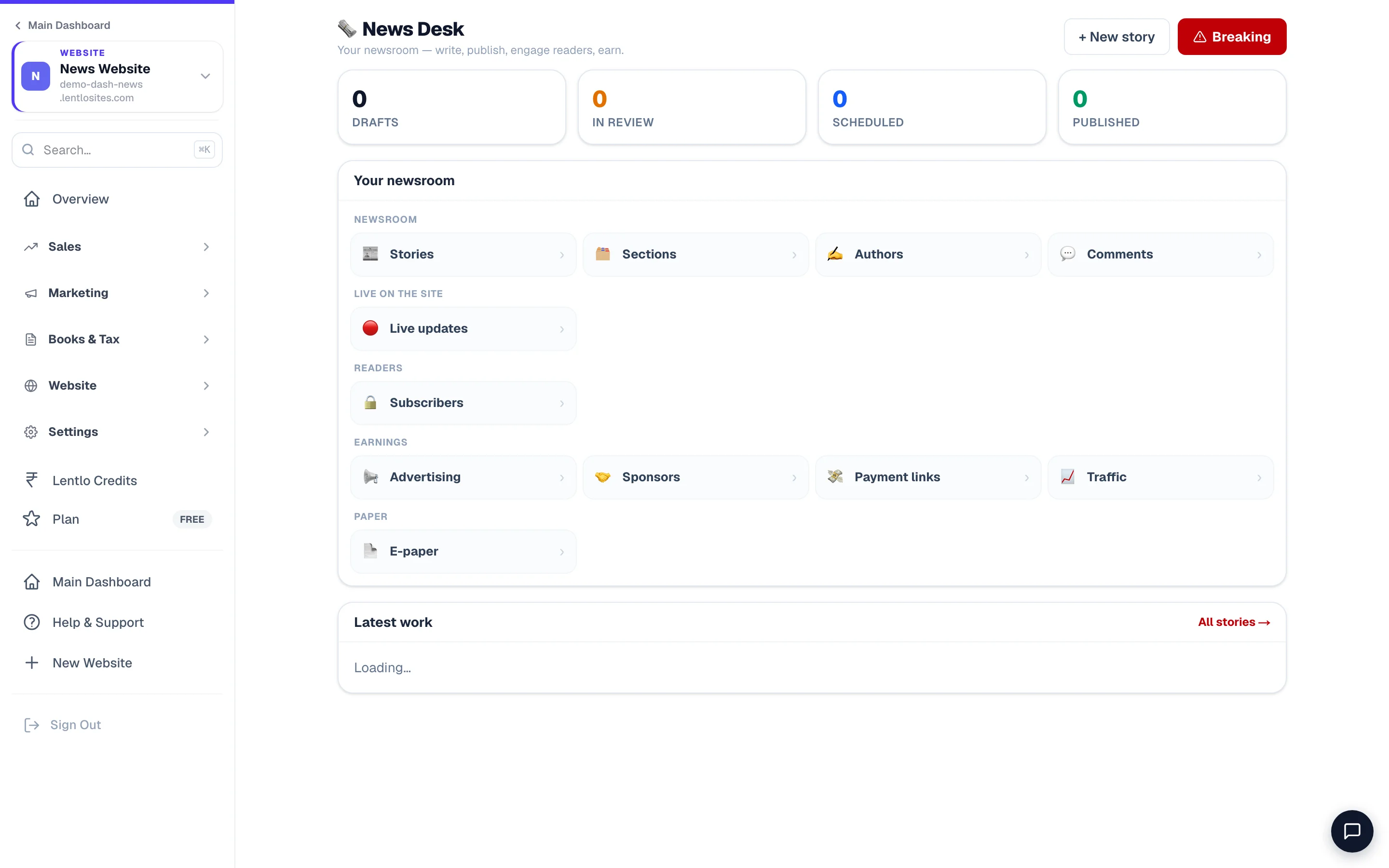
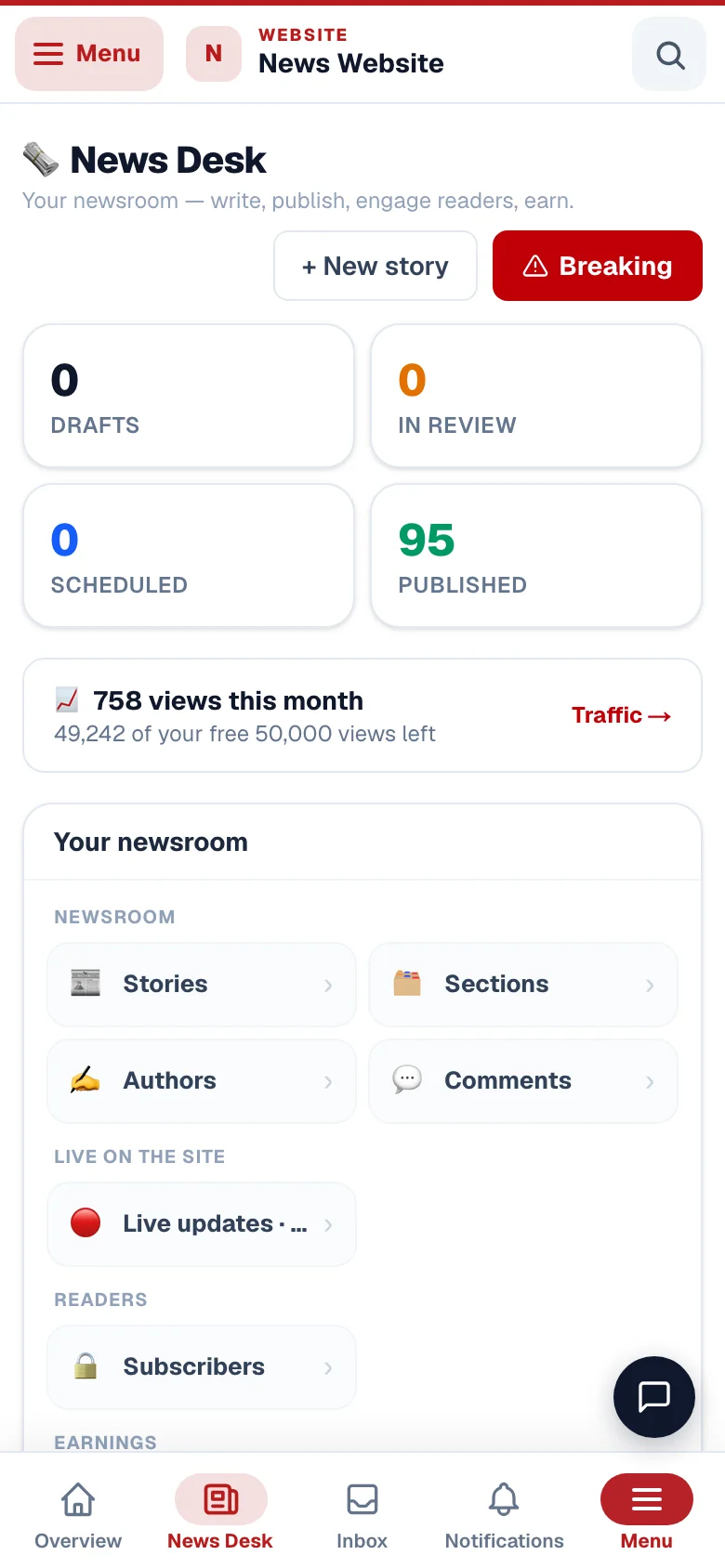
- 1WriteHeadline, story, section, author — then publish or schedule.
- 2Breaking barLive on your site in seconds, with no publish step.
Publishing your first story
Press + New story
Headline first. Write it the way you would say it out loud — a headline that needs a second read loses the reader.
Add the story
The editor takes headings, bold, quotes, links, photos and video. Paste from anywhere; the formatting is cleaned up for you.
Set the section and the author
A section (City, Sports, Business…) decides where the story files itself on your site. The author gets a byline and their own page.
Choose free or paid
A free story is fully readable. A paid story shows an opening teaser and then asks for a reader pass — see Charging readers below.
Publish, or schedule it
Publish puts it live now. Scheduling holds it for a time you choose — useful for a result you already know is coming.
Sections and authors first. Ten minutes setting up City / Sports / Business and your two reporters saves re-filing every story later.
Breaking news and the ticker
Leave the ticker's manual list empty and the bar runs your latest headlines on its own; anything marked Breaking always leads. The bar is baked into every page with today's lines, so it shows headlines from the first moment — never an empty red strip.
A breaking bar and a scrolling ticker are the two things a news site needs to feel alive, and neither needs a publish step. There are two ways to feed the bar: the Breaking button on the Desk opens the story composer with the BREAKING label already set — a story marked that way always leads the bar — and Live Updates → Ticker itemstakes one-line entries (“Board results at 2 pm today”) with no story behind them. Every page is built with the current lines already in the bar, so it moves from the first moment, and each page refreshes them as it opens: a line you type now is with readers inside a minute.
- You add the lineA Breaking story, or a ticker item
- Live within a minuteNo rebuild, no publish
- Every reader sees itOn the next page they open
The one thing that does need a publish is turning the red bar itself off or back on — the lines inside it never do.
Use Breaking sparingly. A red bar that is always on stops being read within a week.
Live updates is the longer form: a running post you add entries to during an election count, a match or a civic event. That one really does refresh itself — readers with the page open get new entries every half a minute, without touching anything.
Charging readers — reader passes
How readers buy (since Sept 2026): on /subscribe they tap Subscribe — pay online, sign in with a one-time OTP, pay on your own gateway, and land back on the story they came from — the pass activates on the number they signed in with, so it can never go to a mistyped phone. Plan cards show the per-day price, savings and a Best value / Most popular badge automatically. Passes never auto-renew: the Circulation tab lists Renewals due (next 7 days) and Lapsed readers with a one-tap WhatsApp message that carries your subscribe link.
Three more levers (Sept 2026): First-pass price — give a plan a lower “try us” price that a reader pays only the first time on your paper (renewals pay the plan price; set it when you add the plan or with the Intro ₹ button). Gifts — under every plan readers can Gift this pass to someone: they sign in, enter the other person's mobile number and pay; the pass activates on that number and the recipient gets an app notification (and your WhatsApp template when mapped), while the buyer gets a one-tap WhatsApp note to send. Automatic renewal reminders — 3 days before a pass ends and on the day it ends, the reader gets an app notification with a renew link, plus your WhatsApp template when you map Reader pass ending in the WhatsApp hub. Free, on by default; switch it off in Circulation if you prefer to nudge by hand.
Mark a story paid and readers see an opening teaser, then a prompt to buy a pass. A pass is a simple time-based purchase — a day, a month — not a recurring subscription you have to manage.
The paywall is real. The full text of a paid story is never sent to the browser — only the teaser is. A reader cannot get the rest by viewing the page source or turning off JavaScript, which is how most website paywalls are defeated.
Money reaches you through your own payment gateway, exactly like a shop order.
Sponsored stories work the same way.
On the free plan a commission of 5% — never more than ₹50 on any one payment — is taken from your account credits when a pass or a sponsor booking is paid. On any paid plan it is nothing at all.
Earning from advertising and sponsors
- AdSense. Paste your AdSense publisher ID (the
pub-…number) in the Advertising room, then set each position on the page to Google AdSense, a banner you sold, your own promo, or Off. The space is reserved in advance, so ads never make the page jump while a reader is reading. Google's own approval needs your own domain, about twenty original stories and filled About and Contact pages — the readiness checklist in that room walks you through it. - Verification is automatic. The moment your publisher ID is saved, every page carries the AdSense verification tag and the ads.txt line Google looks for — nothing to paste into a file, nothing to ask anyone for.
- Your own banners. Sell a slot to a local business directly and upload the image. You keep everything. Type your own daily rate against each position and the Sponsors room suggests prices from it.
- Web Stories. Two more positions: Between stories — a full-screen page with a Visit button after every few stories a reader watches, filled with a banner you sold or your own promo — and Google's story ads, which Google places inside your Google Web Story pages and pays through AdSense. A story a business paid for is marked "Paid partnership with …" from its Story settings.
- Sponsors. A shop pays to sponsor a story. Send them a payment link from the Sponsors room; the story is marked as sponsored the moment you link it, which is what disclosure rules require — not when the money lands.
Example · The Nagar Samachar, a district weekly
Two banner slots at ₹3,000/month to a jeweller and a coaching centre, plus roughly two sponsored stories a month at ₹1,500. That is ₹9,000 a month from a site that costs them ₹199 at the very most — before a single reader pass is sold.
Getting paid for anything else
A paper is asked for money all day — a classified line, an obituary notice, a matrimonial listing, coverage of an event, a press release, a reader who wants to support you. The Payment Linksroom turns any of those into a link in about ten seconds: say what the payment is for, type the amount (₹10 or more), add the payer's name and number if you have them, and share the link on WhatsApp. One tap pre-fills the common ones.
The money goes into your own payment gateway account, the row moves from Awaiting payment to Paid by itself, and anything you collect in cash or on your own UPI you simply mark as received — that one carries no fee at all.
What it costs you
A news site is priced on readers, not on products — that is the only fair way to charge a publisher.
The free plan and what comes after
- Page views included every month
- 50,000
- After that, per started 10,000 views
- ₹10
- Most you can ever be charged in a month
- ₹199
- Your site is never slowed or taken down for this
- —
The paid plan removes the meter completely. It is a flat ₹999 for the year — no page-view fee however big the month gets, and no commission on reader passes or sponsor bookings. A paper doing serious traffic is usually better off there than on free.
The Trafficroom shows this month’s page-view count, so there are no surprises. The number there is the same one your Analytics page shows — staff visits are excluded from both.
Comments
Comments are off until you turn them on, and when on, every comment waits for your approval before anyone else sees it. Commenters verify their phone number first, which removes almost all spam before it reaches you.
Do this
- Turn comments on for one section first — City or Sports
- Clear the queue once a day; a two-day-old approval is pointless
- Reply to one or two yourself — it sets the tone
Not this
- Open comments on political stories before you have time to moderate
- Leave the queue for a week and then approve in bulk
The e-paper
If you also print, upload the day’s PDF and readers get a page-turning edition on your site — a strong reason for print readers to visit you online, and a page advertisers understand immediately.
Choosing a look
The news designs are genuinely different papers, not colour swaps — a broadsheet, a Hindi daily, a sports desk, a magazine weekly — plus a blank-canvas option if you would rather build the home page block by block around the same newsroom. Everything in this guide works identically on all of them, so pick on looks alone — and open each design's live demo first: every word, colour and photo can change afterwards, but the design itself cannot be swapped with a button later.
Common questions
Do I have to publish the site after writing a story?
No. Press Publish on the story and the site rebuilds itself in the background a few seconds later — nothing for you to press. Ticker lines, breaking headlines, polls and comments do not even need that: they are fetched live by the page. You only press Update Website for design changes.
Will Google News pick us up?
Your site is built the way Google News expects — sections, bylines, dates and article markup. Beingacceptedis Google’s decision and depends on publishing consistently for a while.
Can reporters log in without seeing my money?
Yes. Give them a team login limited to stories — see Add team members.
Can I use videos?
Yes. Uploaded video is compressed for you and shows a poster image first, so nothing downloads until a reader taps play. YouTube embeds are loaded the same way.
What if I go over the free allowance in a big news month?
On the free plan you are billed ₹10 per started 10,000 views beyond the first 50,000, from your account credits, and never more than ₹199 in a month. Your site keeps running exactly as before — traffic is never throttled and readers never see anything different. On the paid plan there is no page-view fee at all.
More in For your kind of business
Did this answer your question?
It takes one tap and it genuinely changes what we write next.