
Wholesale & dealer prices (member pricing)
Give dealers and regulars their own rate on the same website — without showing it to the public.
5 min readUpdated 8 Sep 2026
In this guide
What it actually does
You create a group— “Wholesale”, “Dealers”, “Staff” — give it a price rule, and add customers to it. When one of those customers is signed in, they see their price everywhere: product pages, cart, checkout, invoice.
- Turn it onManage → Member Pricing
- Make a groupe.g. Wholesale — 15% off
- Add customersPaste their phone numbers
- They see their priceOnce signed in, everywhere
Everyone else is unaffected. Until you add a customer to a group they see exactly the prices they always saw — the whole feature is invisible to the public.
Setting it up
Open Member Pricing
Manage → Member Pricing. Until you create a group it reads OFF — everyone sees normal prices.
Create your first group
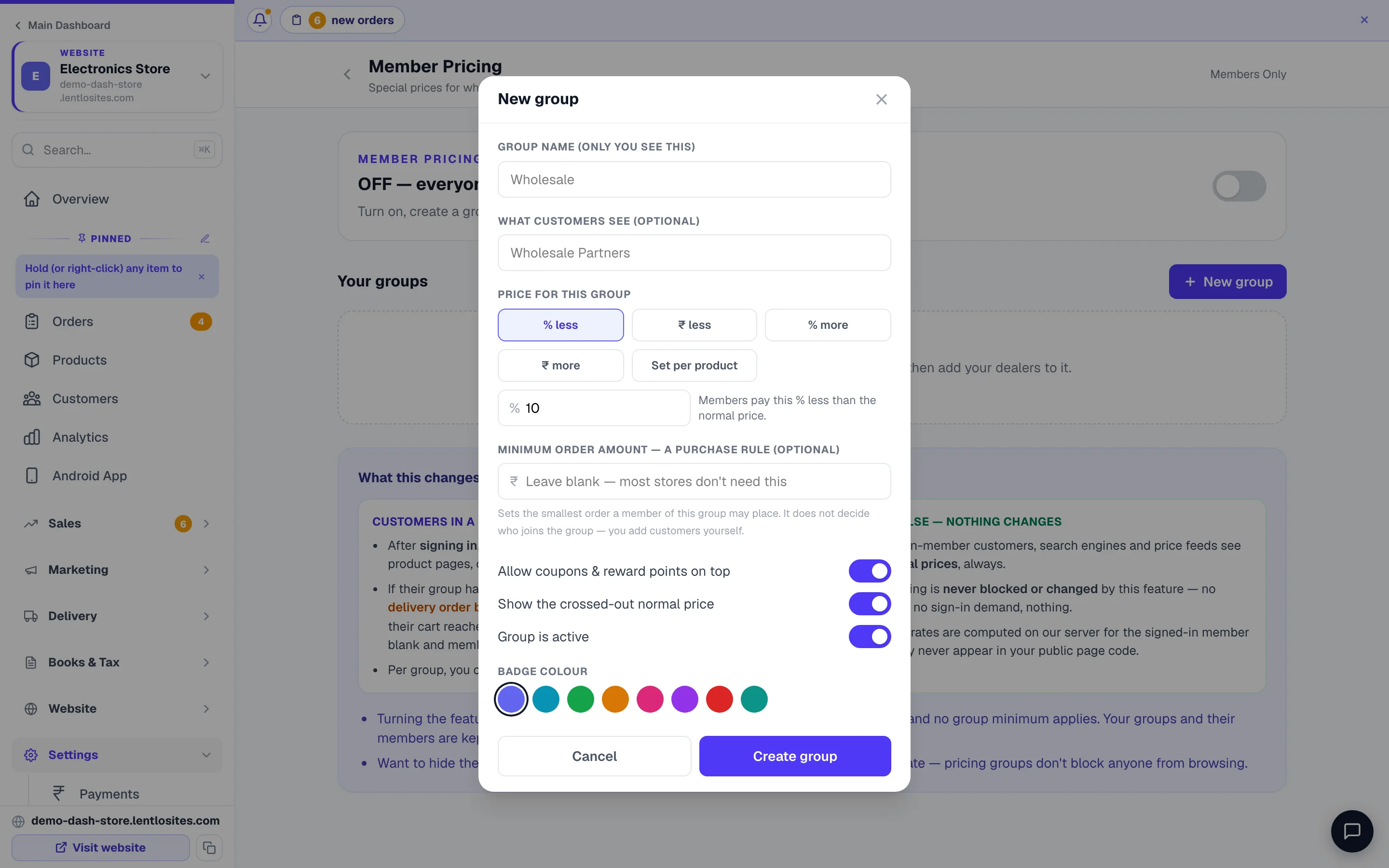
Press New group and name it the way you think of it — Wholesale, Dealers, Bulk buyers. The group name is only for you; What customers see is the optional badge they get shown. Pick a badge colour if you like.
Set the price for the group
Five ways, and you pick one: % less, ₹ less per item, % more, ₹ more, or Set per product— an exact rate you type product by product (down to a single size or colour) on the group card’s Product prices button. Yes, more is deliberate: some shops charge a small premium for a service tier or a credit account.
Add customers to it
Add customerson the group card takes a list of phone numbers, one per line — paste them straight from your diary. A number that is not yet a customer is created as one, so you can set up your dealer list before their first order. You can also switch one person’s group from their page in Customers.
Tell them to sign in
Their price appears once they are signed in with the phone number on their account. Signed out, they see public prices — which is the point.
Where the group price sits in the maths
The group price replaces the base price of the line. Everything else is then calculated on top, in the usual order. Member prices are always shown in whole rupees, and the member is charged exactly what they see — a percentage that lands on ₹40.70 is rounded by the rule you choose in Show member prices as (nearest ₹1 by default, or always up, always down, nearest ₹5 or nearest ₹10).
A dealer buying 10 units at 15% off
- Public price × 10
- ₹10,000
- Dealer group price replaces it (−15%)
- ₹8,500
- Coupon, if any, applies after
- − ₹0
- GST calculated on the dealer price
- + ₹1,530
- Delivery as normal
- + ₹0
- Dealer pays
- ₹10,030
A different minimum order for a group
A group can carry its own minimum order amount, which overrides your shop-wide one for those customers. That is how “wholesale starts at ₹10,000” works without blocking retail buyers. Store pickup is exempt.
It is a purchase rule, not a joining fee.A member of that group cannot place any delivery order below it — the Place Order button stays locked until their cart reaches the amount. One real shop typed ₹49,999 there meaning “spend this much to become a dealer” and blocked 56 members for a month. Leave it blank unless you genuinely mean a minimum purchase.
Two switches per group
- Allow coupons & reward points on top — off means a dealer rate is the final word and no coupon can be stacked on it.
- Show the crossed-out normal price — on, the member sees what everyone else pays struck through beside their rate; off, they simply see their price.
Example · Nirmal, a plastics wholesaler in Rajkot
Retail customers buy from ₹500. His dealer group is 22% off with a ₹15,000 minimum. Dealers order online at 11pm instead of calling him for a rate list, and he stopped quoting prices on WhatsApp entirely.
Why nobody can cheat it
A group is never taken from anything the customer’s browser sends. The price is resolved on our servers from a verified sign-in, an order you created yourself, or a stored phone number on a repeat order. Typing someone else’s number at checkout gets you nothing.
Your dealer prices are never present on a public page — not in the HTML, not in a hidden field. A shopper cannot read them by viewing the page source.
Using it well
Do this
- Keep groups few — Wholesale and Dealers is usually enough
- Set a minimum order on the group if the rate depends on volume
- Tell dealers plainly: sign in and you see your rate
- Review the group list every few months
Not this
- A group per customer — that becomes unmanageable fast
- Promising a rate you then apply by hand on each order
- Typing a joining amount into 'Minimum order amount' — it blocks their orders
Common questions
Does the customer know they are getting a special price?
They see their price; we do not print “you are in the Dealers group” on it. Most owners tell the customer anyway — it is the point of the relationship.
What if a group customer uses a coupon too?
That is the group’s own switch — Allow coupons & reward points on top. Turn it off and a dealer rate cannot be stacked with a coupon or points.
Can I set a specific price rather than a percentage?
Yes. Choose Set per product and type exact rates on the group card’s Product prices screen — per product, or per size and colour where a product has them. Anything you leave blank stays at the normal price.
What happens if I switch the whole feature off?
Everything pauses at once: every member sees normal prices and no group minimum applies. Your groups and their members are kept, so switching it back on restores them exactly.
Does it work for orders I create myself?
Yes. When you make a manual order for a group customer, their price is applied — you do not have to remember the rate.
What if I block a customer who is in a group?
A blocked customer never gets the group price. The moment you block someone (from their customer profile or Manage → Access), their member price stops on the website, in the cart and at checkout — even though they still appear in the group. Unblock them and the price is back on their next page load. On a Members Only website the group price applies only to approved members; a request that is still pending sees the normal price.
How is this different from Members Only?
Members Only hides your whole catalogue until you approve someone. Member pricing keeps the shop public and only changes the price for chosen customers. They can be used together.
More in Payments, GST & books
Did this answer your question?
It takes one tap and it genuinely changes what we write next.