
Build an education website — coaching, tuition, school
Parents decide on results, faculty and fees. Get those three on the page, turn enquiries into demo-class bookings, and work the list.
8 min readUpdated 21 Oct 2026
In this guide
Is this you?
Coaching institute · tuition centre · home tutor · JEE / NEET / UPSC academy · spoken-English or skill classes · computer institute · school · pre-school and play school · college. Anywhere a parent or student enquires, visits, and then enrols for a term.
Selling recorded courses as downloads or a subscription is a different job — see Selling downloads and Repeat orders & subscriptions.
Pick your design
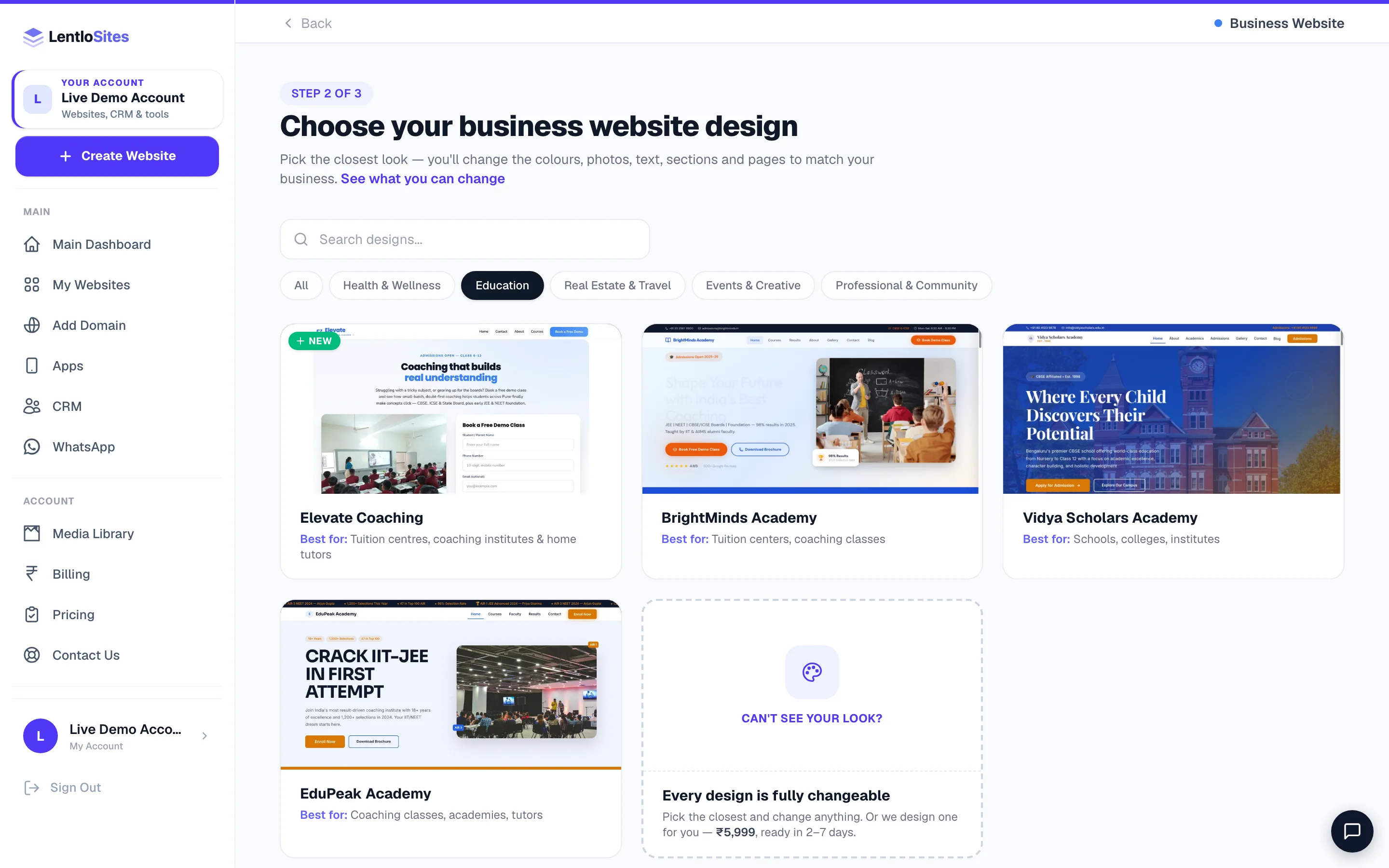
All six live under the Business Website card at Create Website, under the Education pill — where the preset comes first. Pick the closest one: the words, photos, colours, sections and pages all change afterwards.
| You run | Start with | Why that one |
|---|---|---|
| A tuition centre or coaching institute, block-built so you can rearrange it | Elevate Coaching (preset) | Built on the canvas: courses, a timetable, faculty, results, an admissions strip, an FAQ and a consultation form — every page a stack of blocks you can reorder or delete. |
| A coaching academy that leads with results | EduPeak Academy | A results ticker in the navigation, a topper showcase, a fee calculator and a course comparison table. |
| A coaching class for entrance and scholarship exams — Navodaya, Sainik School, the Military Schools, RIMC, NMMS and state scholarships | Abhyas | An Exam Finder where a parent taps the child's class, selection cards with a Selected stamp, the two ways to learn compared side by side, a notice board that counts down to the next exam, a free webinar whose form hands parents to your WhatsApp group, and free papers with the exam calendar. App, Books and Offer pages are there to switch on. |
| The same kind of class, with a look built from a child's school bag | Pravesh | Everything Abhyas does, drawn as the things of the exam year: a notebook-cover header with folder tabs and a countdown to your next date, a practice admit card with your class's round seal, an answer sheet where a parent fills the bubble of the child's class, the try-first steps as a question paper, a printed merit list with photo prints, this week's timetable as a chart, and an admission form right on the home page. |
| A tuition centre with batches and year-wise results | BrightMinds Academy | Toppers wall with ranks, batch schedule table, fee cards, year-wise results, study material and a demo-class booking page. |
| A school, pre-school or college | Vidya Scholars Academy | Academic programmes, an admission-process timeline, a fee structure table, faculty, campus gallery and an achievements timeline. |
| Something none of these fit | Blank canvas — all-in-one | Build the exact pages your institute needs — see Start from a blank canvas. |
Keep these ready
Your first hour, in five steps
- Institute infoName, phone, address, hours
- Results & facultyThe two trust sections
- Courses & batchesWith timings and fees
- Demo-class bookingThe real conversion
- PublishThen share in your parent groups
Fill your institute details once
Settings → Business Info. Name, phone, email and address flow into the header, footer, contact page and every enquiry message; your WhatsApp number sits on the Social & Links tab next to it, and office hours go in the editor's Site Settings. See Site Settings.
Put results and faculty up before anything else
Open the editor and fill the results and faculty sections with your own — names, ranks, photos, qualifications, years of teaching. If you do not have results to show yet, hide the section rather than leave the design's samples in it. A parent who spots a sample name stops reading.
List courses, batches and fees
Each course with what it covers, who it is for, the batch timings and the fee (a range is fine — “₹18,000–₹24,000 per year depending on the batch”). This is the page parents screenshot and forward to each other.
Turn on bookings and call it “Demo class”
Bookings → Settings: set your weekly availability and add your services — a Demo class, a Counselling session, a Campus visit. In the same settings you can rename what customers see (“session”, “class”, “consultation”), and the phone number is verified with a one-time code so the leads are real. See Appointments & bookings.
Publish and share it where parents already are
Press Publish Website, then put the link in your existing parent WhatsApp groups, on your board and in your admission pamphlet. See Publish your site.
If you chose Abhyas or Pravesh
Abhyas and Pravesh are built for classes that prepare children for one exam — a seat in Navodaya, Sainik School, a Military School, RIMC, or a scholarship. They share the same settings, so four things are worth setting before anything else on either.
Type your exams once
In the editor open Site Settings → Exams & Classes. The list Exams you prepare for is the one list the whole website reads — the Exam Finder, the moving strip, the footer, the results filter and the exam choice in every form. Fill For children now in class with the class a child is in when they sit the exam (type 5, 8 for two classes), so the finder shows the right exam when a parent taps their child's class.
Dates that count down
The notice board on the home page, the exam calendar on Free Resources and the Offer page show a live countdown to a date you type. Type it like 17 Jan 2027 or 2027-01-17; leave it empty while the date is not announced. A date the website cannot read shows exactly as you typed it, with no countdown. On Pravesh the yellow strip above the header can count down too: Site Settings → Top Strip → Countdown to a date, with the words after the days (to the exam) beside it.
Hand webinar parents to your WhatsApp group
In Site Settings → Forms & Parents' Group, paste your group's invite link into Parents' WhatsApp group link. After a parent registers on the Free Webinar page, the form shows a link to the group and opens it a moment later (switch off Open the parents' group by itself after registering on the webinar page to leave the link for the parent to tap). With no link set, the form shows the line under it instead — After you register, we send the joining link on WhatsApp.
On Pravesh, if the picture on the home page's webinar ticket is a poster with writing on it, open the home page's Free Webinar section and set How the poster or photo shows to The whole picture, so none of its words are cut off. A film, when you add one, always fills the frame.
Switch on App, Books or Offer only when you use them
These three pages start switched off. Turn one on from the page list in the editor when you have the thing it shows — your app's store link, your books, or an admission offer. Once on, a page joins your menu like any other; an Offer page made for an advert is usually better kept out of the menu — see Header & Footer menus. Until you type your own heading for the home page's books and papers band, its heading names only what is switched on — Free practice papers while Books is off.
Every selection card carries your result stamp (Selected, or the word you set in Site Settings), so put only children who got a seat on those cards. A success story on the Results page may be about a child who was on the waiting list or simply improved: open that story under Success Stories and switch off Show the result stamp on this story — the story stays, the stamp comes off.
Enquiries, and what they cost
An education website has no cart, so there is no per-sale fee. What it produces is enquiries, and on the Free plan each one costs ₹5 from your credits — no enquiry, no charge. Starter is ₹1; Pro and Growth are ₹0. Any form that carries a phone number counts — an admission enquiry, a webinar registration, an offer form — and the same number on the same day is counted once.
A month of admissions enquiries on the Free plan
- Enquiries and demo bookings received
- 120
- Charged per enquiry
- ₹5
- Total platform cost for the month
- ₹600
- Enrolments from those enquiries (a normal 1 in 8)
- 15
- Cost per enrolment
- ₹40
- Set it against one term's fee and the decision makes itself
- —
Charging fees online is possible but rarely the right first move — most institutes take fees at the desk. If you do want to collect an admission or exam fee by link, raise a bill for the student in your CRM and send it on WhatsApp — its page has a UPI button and QR, and can carry a payment link. See Billing in the CRM.
What actually convinces a parent
Do this
- Real results with real names and ranks — with the family's permission
- Faculty photos with actual qualifications and years taught
- Batch timings, start dates and fees in plain numbers
- Photos of your own classroom, lab and library
- One clear next step on every page: book a demo class
Not this
- Stock photos of a foreign campus
- “100% selection guaranteed” — nobody believes it and it invites trouble
- Leaving the design's sample toppers and sample faculty in place
- Hiding fees behind an enquiry form
- A form that asks fifteen questions before a parent has decided anything
Example · Deepak, a JEE coaching centre in Kota
Deepak listed 18 real results with ranks, four faculty with their years of teaching, three batches with timings and a fee range — and turned the booking service into “Free demo class”. Enquiries went from a trickle to about 30 a week during admission season, and because the phone number is verified before the form submits, his counsellor stopped calling wrong numbers.
After you are live
| You want to… | Read |
|---|---|
| Work the enquiry list | Contact form inbox · Contacts & leads |
| Take demo-class bookings and send reminders | Bookings · Notifications |
| Be found for “coaching near me” | Get found on Google |
| Answer the same admission questions once | FAQ page |
| Publish notices, results and articles | Publishing posts |
| List more than one centre | Stores & Branches |
| Give your counsellor a login | Add team members |
| Raise fee bills and receipts | Billing in the CRM |
Common questions
Can students pay fees on the website?
Yes, though most institutes collect at the desk. The simplest route is a bill per student from your CRM, sent on WhatsApp: the page shows the fee with a UPI button and QR, and you can add a payment link through your own gateway. See Billing in the CRM.
Can I sell books or a test series?
On Elevate Coaching (the preset) yes: Settings → Appearance → What this website does → switch on Sell products online, and a shop, cart and Orders desk appear alongside everything else. The five fixed designs (EduPeak, BrightMinds, Vidya Scholars, Abhyas, Pravesh) have no shop to switch on; Abhyas and Pravesh have a Books page that lists your books with a button to wherever you sell them (Amazon, your own link) or, with no link, a WhatsApp message that names the book (your enquiry form when no WhatsApp number is set) — take fees and material payments with a bill from your CRM instead, or build the shop side on the preset. Study material as a download: Selling downloads.
Should I publish students' names and photos?
Only with the family's permission, and for school-age children take it in writing. A rank with a first name and initial is usually enough to be convincing, and it avoids the awkward conversation later.
Can parents see a timetable without calling?
Yes — the batch schedule and timetable sections are part of these designs. Keep them current; an out-of-date timetable costs you more trust than not having one.
Do I need GST?
Many education services are exempt and many institutes are not registered. Bills for an education website are raised in the CRM: without a GSTIN they are a Bill of Supply with no tax, and with one they become tax invoices. Ask your CA what applies to you — see Billing in the CRM.
More in For your kind of business
Did this answer your question?
It takes one tap and it genuinely changes what we write next.