
Catalogue websites — show the range, get the WhatsApp
For jewellers, tool dealers and showrooms: your full range with codes and specs, and every enquiry lands on WhatsApp with the item filled in.
7 min readUpdated 14 Sep 2026
In this guide
Is a catalogue right for you?
A catalogue fits
- Price changes daily (gold, silver, metals)
- Price is negotiated or quoted per job
- Big-ticket items nobody buys without talking
- You want the WhatsApp conversation, not an online payment
- Jewellery, tools, machinery, tiles, furniture, hardware
A normal store fits
- Fixed prices you are happy to publish
- Customers can decide alone
- You want payment taken online
- You ship parcels by courier
- Clothing, groceries, electronics, food
Three catalogue designs are available — a jeweller’s (with the rate board), a tools-and-equipment one built around specification tables, and a dealer showroom. Everything in this guide works on all three.
How a customer uses it
- Browses your rangePhotos, codes, specs
- Adds pieces to an enquiryOne, or several
- Sends one WhatsAppItem codes already filled in
- You reply with a priceThe conversation you wanted
There is no cart, no checkout, no online payment. The enquiry arrives on your WhatsApp already carrying the item name, code and — if you show them — the price and a link back to the piece.
Example · Jangid Jewellers, Jaipur
A customer shops the bridal range at 11pm, taps three pieces into the enquiry basket, and sends one message: “Interested in JW-1042, JW-1088, JW-1123”. The shop reads it at 9am with the exact codes — no screenshots, no “the third one from the top”.
Controlling the wording
You decide what the WhatsApp message says. Go to WhatsApp Enquiry in your sidebar.
Set your WhatsApp number
The number every enquiry goes to.
Choose the message style
Full details (name, code, price and link), Quick ask (short), or Ask for best price — which invites a negotiation, and suits dealers.
Pick what goes in
Toggle Product name, Item code, Weight & purity, Today’s price and Product link on or off.
Set the basket wording
The enquiry basket has its own heading, send button and empty-state text — all editable, so it reads like your shop. Customers can also set a quantityfor each item in the basket — the WhatsApp message lists every product with its quantity and link, and you can add a totals line at the end (“Total: 3 products · 5 pieces”) so bulk enquiries are easy to cross-check.
You also choose how the list is sent: on WhatsApp (classic), submitted to you (the customer fills their name and phone, and the enquiry lands in your Leads with every product, quantity and link — works even without a WhatsApp number), or both.
Save & update website
Your live site picks up the new wording.
Every button is optional.The same page lets you show or hide each enquiry button separately — the Enquire button on cards, the WhatsApp / Send Inquiry / Call buttons on the product page, and the basket’s Add buttons — so your website only shows the ways you actually want to be contacted.
Your daily controls live on the Manage page.Open your website’s Manage page and the tiles are grouped the way you work. Sales holds Products, Categories, the Form Inbox (enquiries customers submitted instead of sending on WhatsApp), Reviews (on the designs that show customer reviews — approve them there, or they stay hidden), Analytics, Catalogue PDF and, on the jeweller’s design, Daily Rates. Marketing holds WhatsApp Enquiry — every button, the message wording and the enquiry list. Website and Settings hold the rest. Anything you have switched off still shows, dimmed, with a small Off tag — so nothing feels missing. The hero at the top shows your website address with Visit website and Copy, and quick switches for the blog section and out-of-stock products sit further down.
See who enquired about what
The WhatsApp Enquiry page also shows a Recent enquiries list: every time a customer taps an enquiry button, the product (and the variant they had picked) is recorded with the time. The WhatsApp message still arrives on your phone as usual — this list is your record of which products people are asking about, even when someone taps Enquire but never sends the message.
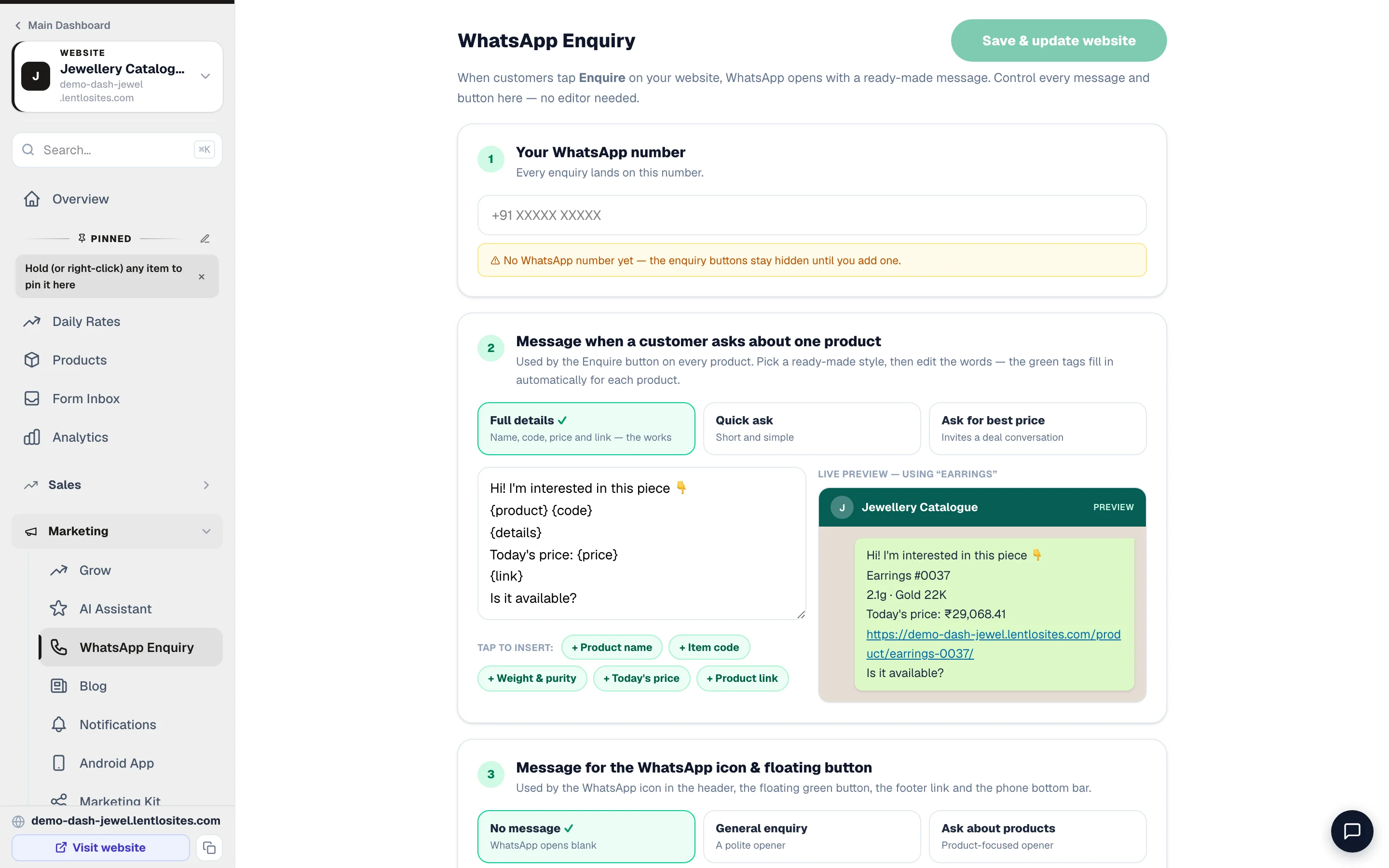
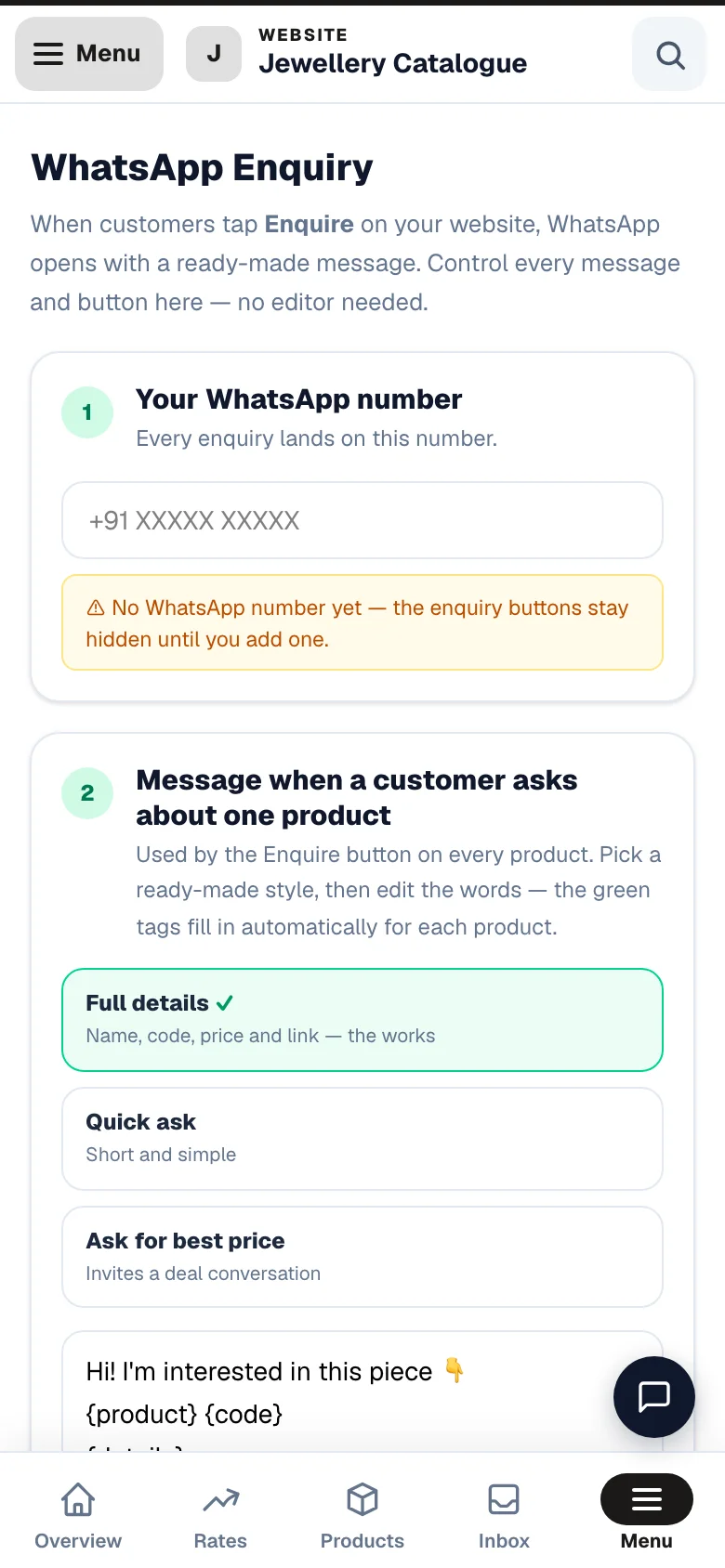
Keep the WhatsApp buttons on your product cards and on the basket Send button. They are how the enquiry is counted — and on the free plan, how billing stays honest.
Three ways to show a price
Weight-based pricing for jewellers
Open Daily Rateseach morning, type today’s gold and silver rates, and every weight-priced piece on your site re-prices itself. Nothing to republish.
The rate board is part of the Swarna Catalogue design only. Calibre (tools and machinery) and Cobalt (dealers and distributors) sell at fixed prices you type on each product, so they carry no Daily Rates page — skip this section if you are on one of those. Everything else on this page applies to all three. Full detail: Daily rates & price-by-weight.
Enter the 24K rate
Press Fill karats from 24K and 22K, 20K, 18K, 14K and 9K are calculated for you. Add silver the same way.
Choose what shows in the top bar
Tick Show in top bar for two or three headline rates. The full board opens from the arrow.
Save Today's Rates
Live immediately, on every page.
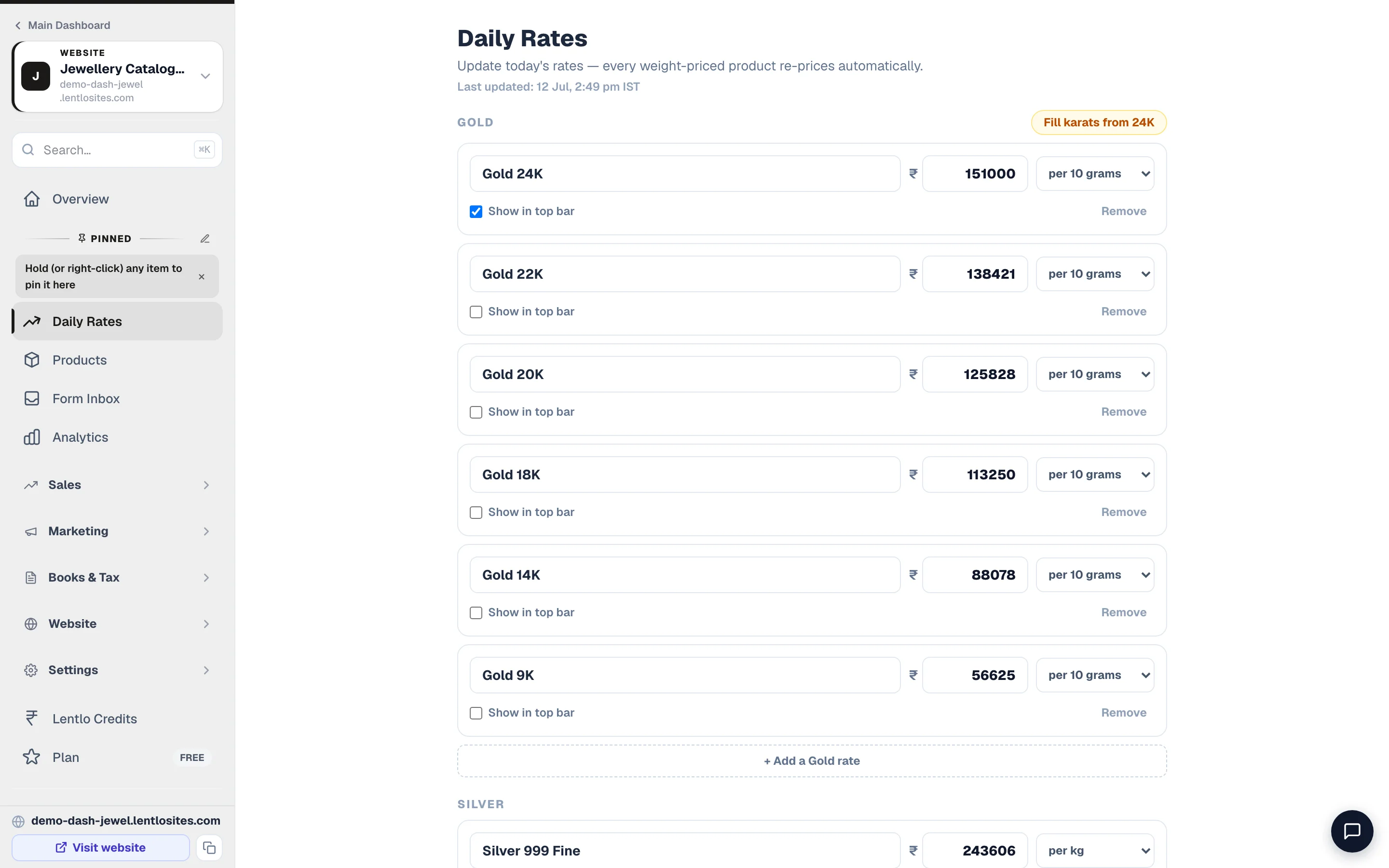
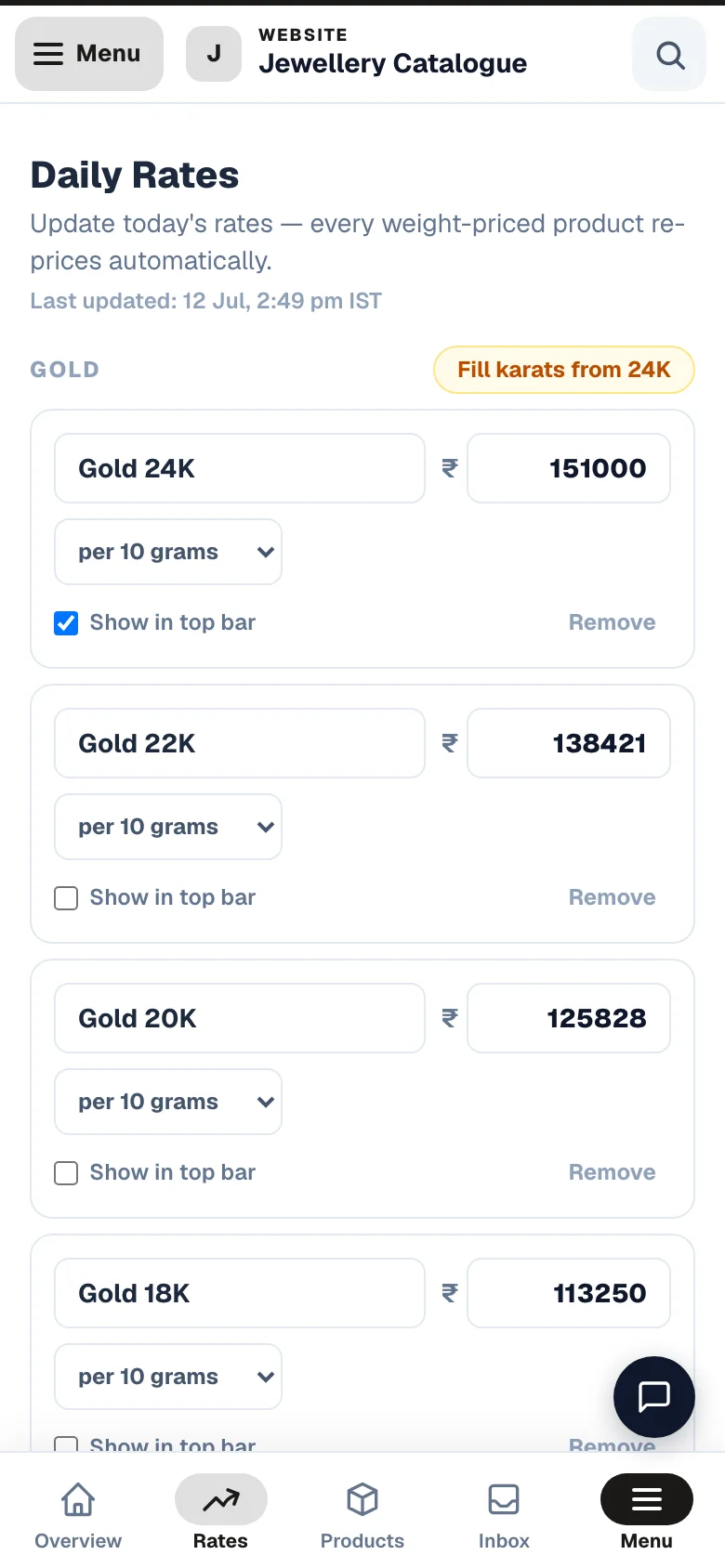
- 1Every morningType today's rates once; every weight-priced piece re-prices instantly.
- 2One number does it22K, 20K, 18K, 14K and 9K are calculated from the 24K rate.
Each piece then shows a transparent price breakup — metal value, wastage, making charges, stones and GST — which is the single biggest trust builder on a jewellery site.
How a 10g 22K ring is priced
- Metal — 10 g × today's 22K rate
- ₹58,400
- Wastage 8%
- + ₹4,672
- Making charges
- + ₹3,500
- Stone charges
- + ₹1,200
- GST 3%
- + ₹2,033
- Shown to the customer
- ₹69,805
- Change the rate tomorrow and every line re-calculates
- —
Rates are read live by your website — a customer with the page already open sees the new rate on their next tap. This is why you never have to publish after a rate change.
What it costs
Two ways to pay
- Free plan — per WhatsApp enquiry
- ₹5
- Same visitor enquiring twice in a day
- counted once
- Busiest day imaginable — most enquiries charged in one day
- 30
- Pro — flat, per year
- ₹999
- Pro works out cheaper past ~200 enquiries a year
- —
Both plans include everything: unlimited pieces, the rate board, your own domain, the enquiry basket. Nothing is locked behind the paid plan — you are only choosing how to pay.
Making a catalogue that sells
Do this
- Give every piece a code — it is how customers refer to it
- One clean, well-lit photo per piece beats four dark ones
- Fill in weight, purity and stone details — buyers compare on these
- Group into real categories: rings, chains, bridal, daily wear
- Put your shop address and timings where they cannot be missed
Not this
- Upload WhatsApp-forwarded photos — they arrive already crushed
- Leave every piece as 'price on request' — some prices build trust
- One giant category called 'Products'
- Photos with another shop's watermark
Common questions
Can customers pay online on a catalogue site?
No, by design — there is no cart or checkout. You can still create an order yourself from the dashboard and send a payment link if a customer wants to pay. See Payment links.
Can I switch a catalogue to a normal store later?
Yes — talk to us and we will move you across; your pieces and photos come with you.
Do I need GST for the rate board?
The breakup shows GST if you have set a rate. If you are not registered, set it to zero and the line disappears.
Can two people update the rates?
Yes — add them as team members with rate permission. Every change is recorded in the activity log.
What happens if I forget to update the rate one morning?
Yesterday’s rate keeps showing. Nothing breaks — but set a daily phone reminder; a stale rate is the one thing that costs you money on a jewellery site.
More in For your kind of business
Did this answer your question?
It takes one tap and it genuinely changes what we write next.