
Build a food business website — restaurant, café, bakery, catering
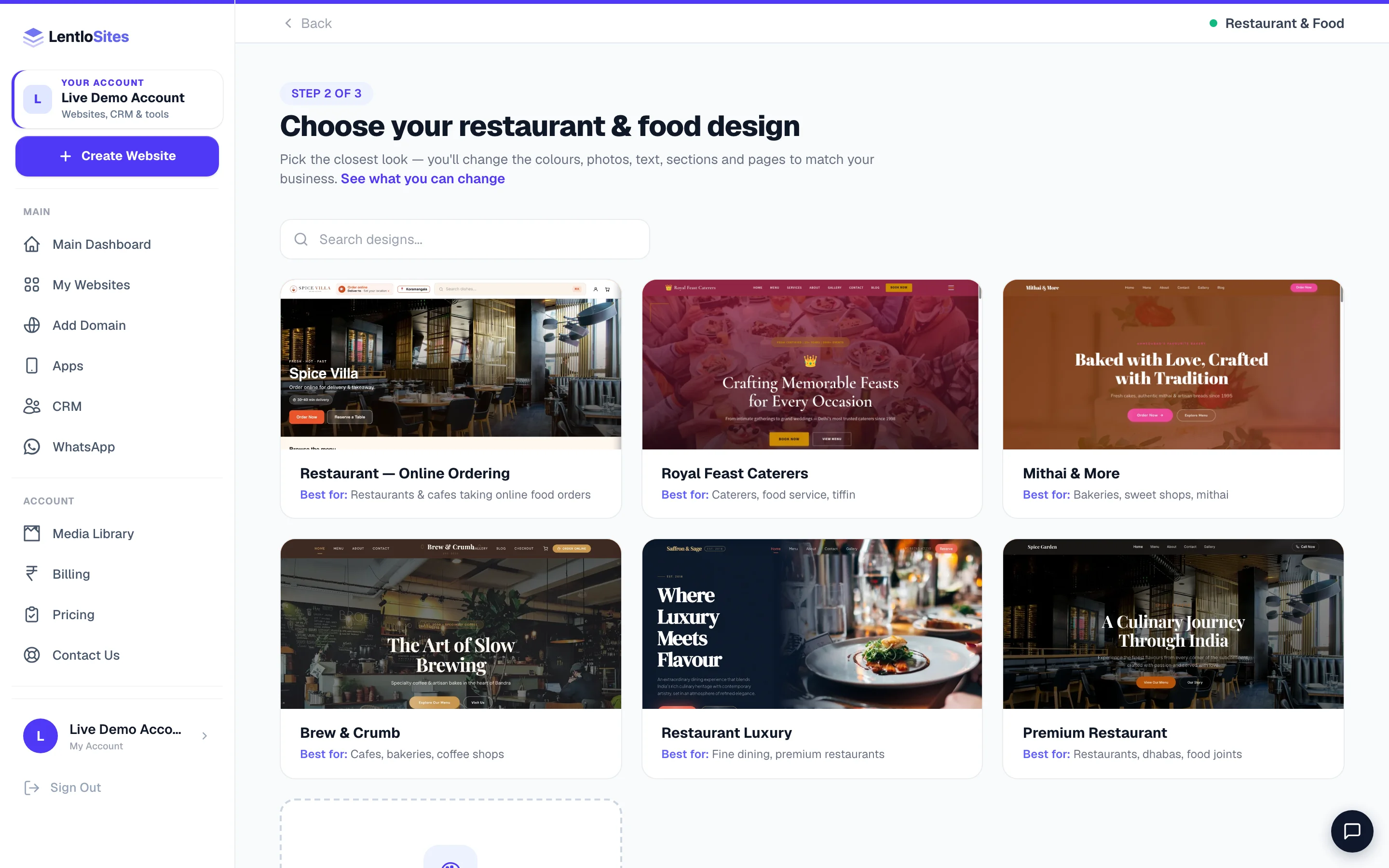
One design takes online food orders, with a kitchen board, table QRs and a billing counter; five show your menu beautifully. Pick the right one first, then set hours, dishes and payments.
9 min readUpdated 21 Oct 2026
In this guide
Is this you?
Restaurant · dhaba · family restaurant · fine dining · café and coffee shop · bakery · mithai and sweet shop · cloud kitchen · caterer · tiffin service. If you cook it and someone eats it, this is your guide.
The one decision: ordering, or a menu?
Take orders online
- One design does this: Restaurant — Online Ordering.
- Delivery, takeaway and dine-in by table QR, each its own switch.
- Kitchen hours, a pause switch, meal timings, a kitchen board, a billing counter and table reservations.
- Orders land in your dashboard; the guest follows each one live — and gets WhatsApp updates from your own number once you connect it.
Show the menu, take the call
- Premium Restaurant, Restaurant Luxury, Brew & Crumb, Mithai & More, Royal Feast Caterers.
- Your dishes with prices and photos, gallery, story, WhatsApp and call buttons.
- Enquiries and table requests come to your Form Inbox and Bookings.
- No cart, no checkout, nothing to run at 9pm on a Saturday.
Only Restaurant — Online Ordering runs the ordering engine. You can save restaurant settings on another design, but the menu ordering, dine-in QR, counter and kitchen controls take effect on that design. If online orders are the point, start there — the look is fully editable afterwards.
Pick your design
All six live under the Restaurant & Food card at Create Website. Pick the closest look — every word, photo, colour and section changes afterwards in the editor.
| Your place | Start with | Why that one |
|---|---|---|
| Any restaurant or café that wants online orders | Restaurant — Online Ordering | The only design with the ordering engine: dish cards with +/− quantity, veg/non-veg marks, a Customise sheet for size, spice level and extras, time-based menus with serving-hour chips, table reservations with capacity checks, dine-in QR, a kitchen board and the billing counter. |
| Restaurant, dhaba or food joint — menu and photos | Premium Restaurant | A photo hero with your hours, phone and address in a strip under the buttons, a moving ribbon of your dish names, your own menu and gallery photos shown on the home page, a menu with veg/non-veg marks and category buttons, a lightbox gallery and a Visit Us band with directions. |
| Fine dining | Restaurant Luxury | Split-screen hero, grain texture, 3D card tilts and a wine-pairing section — a slower, richer page. |
| Café or coffee shop | Brew & Crumb | Filterable menu with dietary tags, a bean-sourcing story and an Instagram grid. |
| Bakery, sweet shop, mithai | Mithai & More | An Indian mithai menu with prices, festival banners, a custom-cake call-to-action and an FSSAI badge. |
| Caterer, tiffin service, food service | Royal Feast Caterers | Per-plate pricing packages, chef profiles, six service categories and a process timeline — written for enquiries, not carts. |
A bakery that wants both — a pretty menu and online orders for cakes — should take Restaurant — Online Ordering and edit it to look like a bakery. Rewriting a page is easy; adding an ordering engine to a design that has none is not.
Keep these ready
Your first hour, in five steps
- Business infoName, phone, address, FSSAI
- Your dishesWith veg / non-veg marks
- Turn ordering onAnd pick delivery / takeaway
- Kitchen hoursSo 2am orders never arrive
- Publish + table QRsPrint and stand them on the tables
Business info, including your FSSAI number
Settings → Business Info for name, phone, email and address (your WhatsApp number is on the Social & Links tab next to it). The FSSAI licence goes in Restaurant → Settings → Compliance, along with your tax setup (restaurant GST at 5%, composition, or not registered) — and it prints in your website footer.
Add your dishes
Dishes are products with two extra controls: Food type (the veg / non-veg mark) and Serving time. Add your best sellers first with a photo and price; the long tail can be text-only. See Add & edit products.
Switch ordering on and choose how you serve
Restaurant → Settings → turn on Turn on online ordering, then pick Home delivery, Takeaway, or both. Nothing about ordering appears on your website until this switch is on — that is the master control. Full guide: Restaurant mode.
Set kitchen hours (and learn the pause button)
Ordering hours mean nobody can place an order at 2am that you will not see. Outside them the full menu still browses with a “we are currently closed” notice that says when you open next, dish photos turn black and white with a grey “Closed” badge where ADD was, and ordering comes back on its own. For a packed kitchen or a gas-cylinder emergency there is Pause new orders, which saves the instant you tap it. Ordering hours are the same every day of the week, so on your weekly off day press Pause new orders before you close.
Publish, then print your table QRs
If you have tables, add them under Tables & QR and print the cards — guests scan, see the live menu and order to their table. Test one with your own phone before the cards go out. See Table QR codes & dine-in.
Getting paid — and what it costs
Delivery and takeaway and dine-in are paid differently, and it is worth knowing which is which before you open:
| Channel | How the guest pays |
|---|---|
| Home delivery | Cash on delivery, online through your gateway or UPI QR, or either — you choose in Restaurant → Restaurant settings → Payments. An online payment includes your delivery fee. |
| Takeaway | Online through your gateway or UPI QR, or at the counter when they collect. |
| Dine-in (table QR) | Normally settled at the counter, or online from the guest's phone if you prefer. |
| Counter / phone orders | The Billing Counter — tap dishes, take cash / UPI / card, print the GST bill. |
A ₹600 online order on the Free plan
- Guest pays
- ₹600
- Your delivery charge
- included above
- Platform fee on the sale
- a small % — see Billing & plans
- Counter and phone orders you type in
- no platform fee
- No order that day
- ₹0
On the Free plan an online order costs 2.5% of the dishes' price (after any discount — never on your delivery fee) from your Lentlo Credits; Starter is 1.2%, and Pro and Growth are 0%. Your delivery fee is worked out on our servers, never on the guest's phone. With a fee by distance, every delivery is charged your first distance until the checkout can measure each customer's distance — and that needs your shop's location. Until it is set, your Overview and your Restaurant page show a Set your shop's location card: tap Set on map, search your shop's name, put the pin on your door and save. (It is also in the sidebar under Delivery → Delivery fee & area.) The checkout then asks every customer for their location.
What makes someone order from you instead of the app
Do this
- Photos of your actual dishes — the app photos are not yours to use
- Veg / non-veg marks on everything; many customers filter on nothing else
- Tag your best dishes Bestseller or Chef’s special — the menu shows them as badges (see Restaurant mode → Your menu page)
- Honest kitchen hours, and the pause switch when you are slammed
- Switch a dish off the moment it runs out (Restaurant → Dish availability) — it shows Sold out everywhere and nobody can add it
- One line in your bill and on your board: “order direct, no commission”
Not this
- A PDF menu — nobody pinches to zoom on a phone twice
- Leaving yesterday's sold-out dish on the menu
- Taking delivery orders outside the area your rider can actually reach
- Printing a table QR before you have placed one test order yourself
- Turning on delivery, takeaway and dine-in on day one — start with the one you already do
Example · Bawarchi, a 14-table family restaurant
Friday evenings used to lose orders because two servers could not reach every table. They printed one QR card per table, kept the menu live, and now guests order the moment they sit down — the kitchen sees the ticket with the table number on it, and the servers carry food instead of notepads. Table time dropped, so the same 14 tables turn more covers.
After you are live
| You want to… | Read |
|---|---|
| Run ordering, hours, delivery fees and reservations | Restaurant mode |
| Put a QR on every table | Table QR codes & dine-in |
| Bill walk-ins at POS speed and print kitchen tickets | Billing Counter |
| Run online orders in the kitchen — new, cooking, ready, one tap each | The kitchen board |
| Work the day's orders | Managing orders |
| Take table bookings | Appointments & bookings |
| Be found for “restaurant near me” | Get found on Google |
| Bring regulars back | Loyalty points · Coupons |
| Sell a meal deal — burger + fries + drink for less | Combo deals |
| Suggest naan with the curry, a drink with the burger | Add-on suggestions |
| Ask “spice level?” or “make it a meal?” when a dish is added | The Customise sheet |
| See what sold, what did not, and your busy hours | Restaurant insights |
| Close for a festival without going offline | Pause ordering |
Common questions
I picked a menu design and now I want online orders. What happens?
Restaurant settings will save, but the ordering, dine-in and counter features run on the Restaurant — Online Ordering design. Create a new website on that design (it costs nothing) and copy your menu across. This is the one case where starting again is genuinely faster.
Can delivery customers pay online?
Yes. In Restaurant → Restaurant settings → Payments you choose cash on delivery, online payment, or both for home delivery — an online payment includes your delivery fee. Takeaway and dine-in have their own payment switches on the same tab.
Can I show a breakfast menu only in the morning?
Yes. Menu timings let you attach serving hours to a category — idli in the morning, biryani at lunch — and a single dish can override its category (all-day filter coffee inside a breakfast-only section). Out-of-hours dishes can never be ordered.
Do I need a printer for the billing counter?
Not to start. The counter works on a phone or computer without one; add a small Bluetooth thermal printer when you want bills and kitchen tickets printing in about a second.
I have two outlets. One website or two?
One. Add each outlet under Restaurant → Outlets with its own hours and phone; customers pick their nearest one and orders carry that outlet's name. Tables belong to a branch too, so each outlet prints its own QR codes.
More in For your kind of business
Did this answer your question?
It takes one tap and it genuinely changes what we write next.