
Ready-made websites you can pull apart
A preset is a finished website whose every page is a stack of blocks — same result for your customers, far more to change afterwards.
6 min readUpdated 21 Oct 2026
In this guide
Preset or design — what actually differs
A ready-made design
- Pages are fixed in shape; you edit their text, photos and colours.
- Often carries a bespoke feature its trade wants — a rate board, a seat map, a bid clock.
- You can still add blocks above, between and below its sections.
A preset
- Every page is a stack of blocks — reorder, duplicate, hide or delete any of them.
- Header and footer arrive as blocks, pixel-identical to the design until you change a thing.
- Built on the same canvas engine as the blank canvas, so nothing is off-limits later.
Finding them in the gallery
Presets are filed by the kind of business they serve, so they appear inside a type card at Create Website — mostly under Business Website. Two things worth knowing:
- They carry a green New chip on the corner of the card — that is what tells a preset apart from an ordinary design. Otherwise the card behaves exactly like any other: it opens the same preview page, with Use This Design and View Live Demo.
- A few of them do not match any of the sub-pills, so if you filter to a pill they disappear. Stay on All, or type the name into the search box (which searches inside the card you have opened).
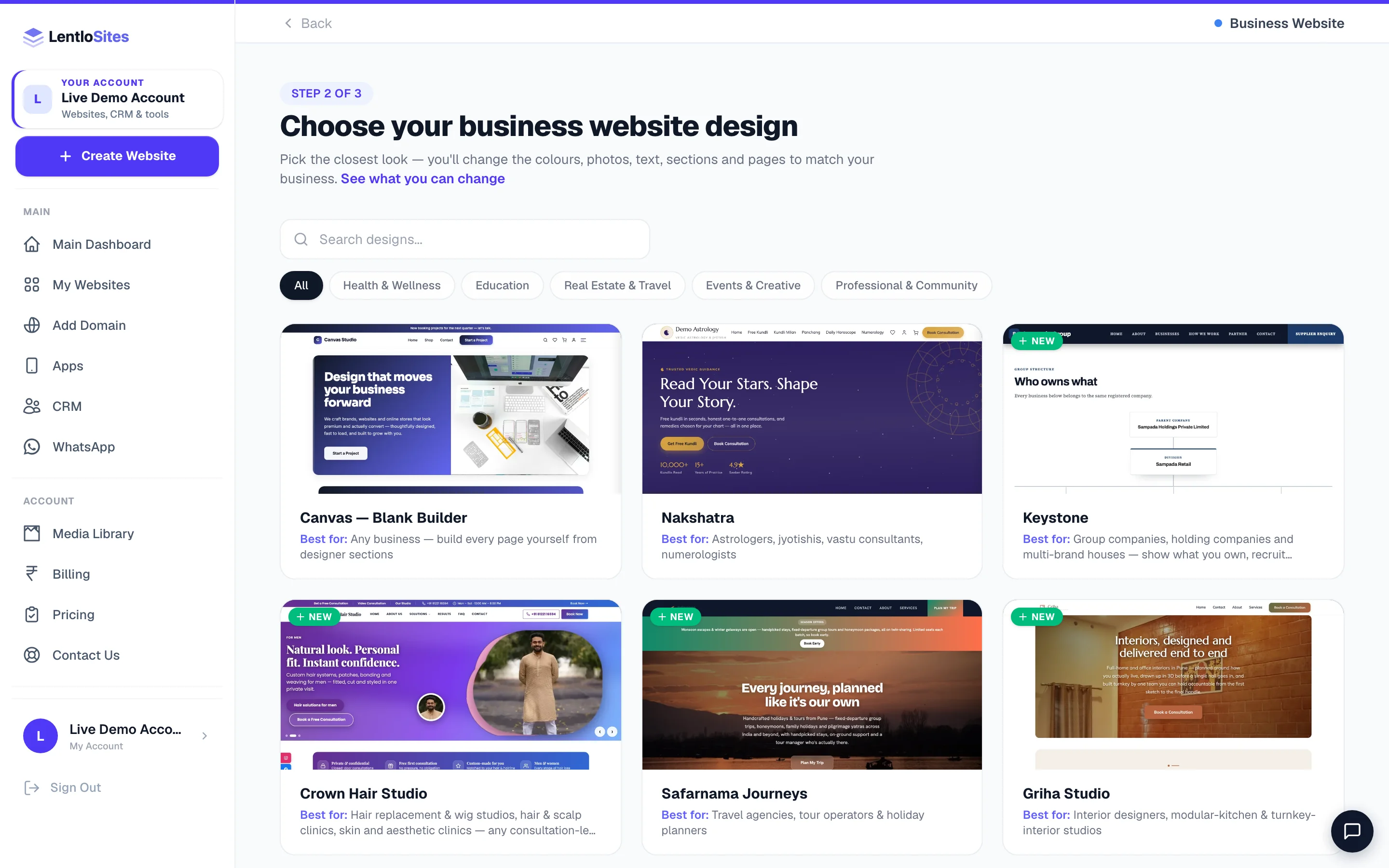
The presets, and who each is for
| Preset | Built for |
|---|---|
| Aura Beauty Lounge | Salons, beauty parlours and bridal-makeup studios |
| Crown Hair Studio | Hair replacement and wig studios, hair and scalp clinics, skin and aesthetic clinics — any consultation-led transformation business. Sixteen pages, a Solutions menu with ten treatments, a consultation form, a before/after slider and a price guide. |
| IronRoots Fitness | Gyms, fitness studios and personal trainers |
| WellNest Clinic | Clinics, doctors and small hospitals |
| Elevate Coaching | Tuition centres, coaching institutes and home tutors |
| Signboard Agency | Performance marketing, SEO, ads and web agencies. Bold poster capitals on signal yellow and black: a sample monthly report beside the headline, services with prices, a moving word band, how a month works, a swipe row of client results, industries, a customer quote, a rate card and a question list. Five pages; a free-audit booking page. |
| Neel Studio | Branding, content, photography and web studios. An elegant serif with italic highlights on indigo and marigold, arch-topped photos: what the studio makes, client work with one number each, who it works with, from brief to launch, fixed quotes and questions. Five pages; a discovery-call booking page. |
| FixPoint Home Services | AC, electrical, plumbing, appliance repair, handyman and AMC work |
| Arthik Advisors | CA and tax firms — ITR, GST, TDS, book-keeping, incorporation, audit |
| Chhaya Studio | Wedding, portrait and event photographers and studios |
| Griha Studio | Interior designers, modular-kitchen and turnkey-interior studios |
| Rangrez Atelier | Boutiques, tailors and couture / bespoke-stitching studios |
| Safarnama Journeys | Travel agencies, tour operators and holiday planners (a brochure site — for live seat and room booking see Travel booking websites) |
| Keystone | Group and holding companies, multi-brand houses, distributors and export houses |
| Ignite | One-page ad campaigns and lead capture — see Landing pages |
What a preset sets up beyond its pages
This is the part that is easy to miss. Creating a site from a preset does more than paste in some sections:
Presets ship sample copy, never fake identity. There is no invented phone number, address, email or business name anywhere — those fields start empty and your setup answers fill them. Sample figures (years, counts, prices) are there on purpose, to show you where your number goes. Replace them before you share the link.
Working on a preset site
Everything you can do on a blank canvas you can do here — because it is the same engine. Open the editor and the page's blocks are listed on the right of the preview, under Sections on this page (on a phone: the Edit Page tab). Drag a row or use Up / Down to reorder, hide with the eye, delete what you will not use, and press Add Section under the list to put anything from the library on the page. Site-wide look lives in Site Settings → Design system. Full tour: Sections & layout.
Do this
- Replace the sample text and photos before you publish — start with the home page
- Delete the sections your business does not have rather than leaving them empty
- Set the Design system once so anything you add later already matches
- Keep the page structure the preset chose until you know why you want it different
- Check the phone frame — presets are built mobile-first and stay that way if you do
Not this
- Leaving the sample figures in a stats band on a live page
- Rebuilding the home page from scratch on day one — edit first, rebuild later
- Adding four more sections to a home page that already has fifteen
- Turning every capability on because the switches are there
Example · Sana, a bridal makeup studio in Lucknow
She started on Aura Beauty Lounge, replaced the hero photo and the service list in half an hour, and published the same evening. A month later she wanted a page telling brides what to expect on the day — she added a page, dropped in a process-steps block and a gallery, and it matched the rest of the site without any styling work, because the Design system was already set.
Where to go next
| You want to… | Read |
|---|---|
| Compare presets against every other design | Which design is right for your business |
| Start from nothing instead | Start from a blank canvas |
| Learn the block library properly | Sections & layout |
| Change the header, footer or 404 page | Header, footer & site-wide blocks |
| Set up bookings on a services preset | Appointments & bookings |
| Build for a specific trade | Services · Education · Professional |
Common questions
Will my customers know it is a preset?
No. A published preset site is a normal website — same speed, same pages, same address. The blocks are how you edit it, not something a visitor ever sees.
Can I delete a page the preset created?
Yes, any of them. Crown Hair Studio ships sixteen pages precisely because that trade needs them; if four of those are not your business, delete them and the menus follow.
Can I switch from a design to a preset later?
Not with a button — a design swap is a new website either way. On most ready-made designs you can, however, replace the header and footer with blocks, which is the part owners usually want. See Header, footer & site-wide blocks.
Do presets cost more?
No. Every design and preset is on every plan including Free. What you pay depends on the kind of business, never on which one you picked.
Why can I not find a preset under a sub-pill?
A few presets do not match any pill's categories, so they only show under All inside their card. Stay on All, or use the search box — it looks at the name, description and keywords of everything in that card.
More in Your website
Did this answer your question?
It takes one tap and it genuinely changes what we write next.