
Cancellations, returns & RTO
The right action for each situation — and what happens to stock, the invoice, commission and the money.
6 min readUpdated 14 Sep 2026
In this guide
Which one is it?
Pick the right action and everything else follows
Do not mark a returned order “Cancelled” from the status dropdown. Cancel and Return do different things to stock and to your GST records — using the wrong one is the most common cause of a stock count that stops matching the shelf.
Cancelling
Cancel is for an order that never went out. It undoes everything cleanly:
- Stock returnsEvery item goes back on the shelf
- Invoice reversedVoided — or credit-noted if its tax month is over
- Commission reversedAny influencer earning is undone
- Wallet credit returnedIf they part-paid with store credit
- Customer toldAutomatically, on WhatsApp
Cancelling an old order raises a credit note instead of voiding the bill. An invoice can only be struck off while its tax month is still open. Cancel an order whose invoice belongs to a month you have already closed and the bill stays on record, with a credit note reversing it — the confirmation message names the note, so you can find it in your books. Nothing extra for you to do; it is simply what GST requires.
If the customer already paid online, cancelling does notmove the money. Refund it in your gateway’s own dashboard — the money is in your account, not ours — then record it on the order.
Returns
The return button appears only once the goods have actually left — packed, ready for pickup, shipped, out for delivery or delivered. An order still sitting at pending or confirmed has nothing to bring back, so Cancel is the right button there.
Open the order and start a return
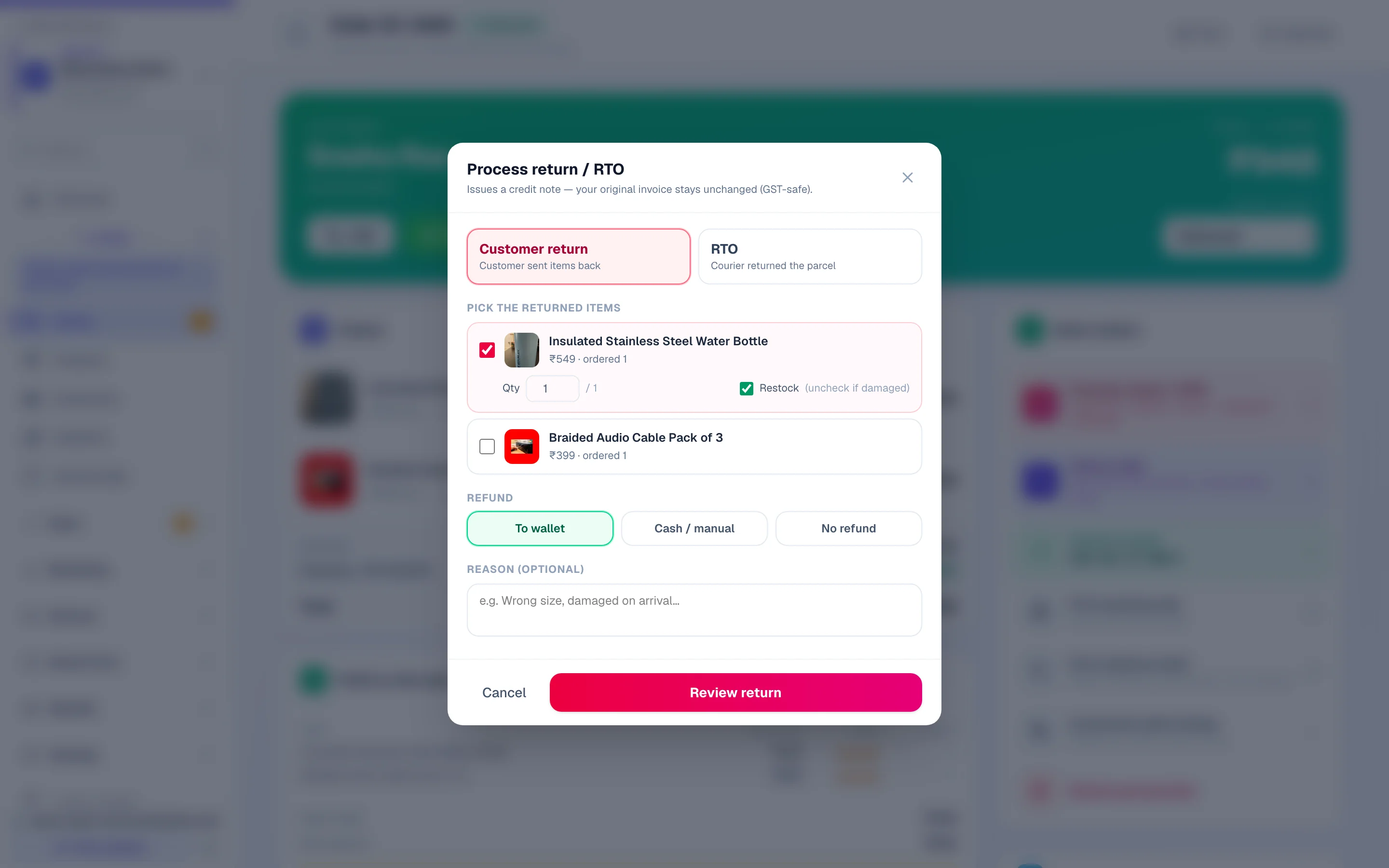
Use the return action on the order rather than the status dropdown, and say which of the two it is — Customer return (they sent items back) or RTO (the courier brought the parcel back). RTO always covers the whole shipment; a customer return can be a single line of a five-line order.
Pick the items, and the quantity of each
Tick the lines coming back and set how many units. If the product has sizes or colours, confirm the right line — two lines of the same product in different sizes look identical at a glance.
Decide what goes back on the shelf
Each line has a Restock tick, on by default. Untick it for anything damaged — a torn kurta must not quietly become sellable stock again. The credit note is unaffected either way; this is only about your shelf.
Choose how the money goes back
Three choices: To wallet (instant, no gateway fee, and the customer usually spends more than the credit when they return), Cash / manual(you hand it over or refund it in your gateway’s own dashboard and record it here), or No refund. On a full return you can also tick Also refund delivery — otherwise the delivery charge stays with you, because the trip really happened.
Read the review, then confirm
Before anything is written you get a plain summary: how many units are coming back, the status the order will move to, the credit note amount and which invoice it is raised against, how many units go back to stock, the refund and its method, and any reward points being reversed. Read it — it is the last honest checkpoint.
Anything you put back on the shelf goes out to your connected shopping channels within seconds — a product that was showing as out of stock on Google or Facebook becomes buyable again without you touching the feed. See Sell on Google & Bing.
One return per order, by design. If more items come back later, raise a credit note by hand for the extra items — the order page points you there. And note that an agent or influencer commission is reversed on a full return or RTO; a partial return leaves the commission alone.
RTO — the courier brought it back
Return to origin is not a customer return: nobody chose it, and it usually means the address or phone was wrong, or a COD customer refused the parcel. Record it as RTO so your delivery numbers show the real picture.
An RTO on a COD order refunds nothing — no money was ever collected. The credit note is still raised, because it is what reverses the GST you already declared. If the order was Partial COD, only the part the customer prepaid online comes back; the balance was never collected. The same goes for an order whose items were paid online with the delivery charge added after the order and not paid yet — the online payment comes back, never the unpaid charge.
Example · Sunita, a boutique in Lucknow
Her RTO rate looked fine until she started recording them properly — then it showed 14% on COD orders and under 2% on prepaid. She turned on Partial COD, asked for ₹100 up front, and RTOs dropped to 4% in a month. She could only see that because the RTOs were recorded honestly.
Watch RTO on the Sales Analytics page under money lost. Above about 8% on COD is worth acting on — Partial COD is the usual fix.
Credit notes
A credit note is the document that says “this much of that invoice is being returned”. Under GST it is what lets you reduce the tax you already declared, so it is created for you rather than left to memory.
A ₹2,360 order with one ₹1,180 item returned
- Original invoice
- ₹2,360
- Credit note for the returned line
- − ₹1,180
- Net sale for your GST return
- ₹1,180
- The original invoice is never edited — that is the law
- —
- Delivery charge — refunded only if you tick it
- not included
Write your policy down
Do this
- State the window plainly — '7 days from delivery'
- Say who pays the return courier
- Say what condition you accept (tags on, unused, original box)
- Put it on your FAQ page so it is answered before they ask
Not this
- 'Returns as per company policy' — that answers nothing
- Promising a refund window you cannot service
- Different rules for different customers with nothing written down
Add it to your FAQ page— “Can I return it?” is in the top five questions for almost every shop.
Common questions
Can I delete an order instead of cancelling it?
Only after cancelling, and never while it has a live invoice — you would orphan a GST document. Cancel first; the system will tell you if you try to skip that.
Does a return show in my sales figures?
Returned and cancelled orders are excluded from booked revenue, so your sales number stays honest. They are counted separately under money lost.
Customer wants an exchange, not a refund.
Return the original and create a new order for the replacement. That keeps stock and GST correct on both sides, which one edited order cannot do.
Part of a COD order was refused at the door.
Edit the order to remove the refused items before marking it delivered, then collect the reduced amount. The invoice regenerates to match what was actually handed over.
Can I refund to store credit instead of the bank?
Yes, and many shops prefer it — it is instant, costs no gateway fee, and the customer usually spends more than the credit when they come back. See Customer wallet.
More in Products & orders
Did this answer your question?
It takes one tap and it genuinely changes what we write next.