
Search & wishlist — what customers are looking for
The search box is the highest-intent moment on your website, every empty search is a lost sale you can fix once — and a saved product can now tell its customer when the price drops.
5 min readUpdated 21 Oct 2026
In this guide
Search — the most honest page on your website
Somebody who types into your search box has already decided to buy something; they are only looking for it. That makes search the highest-intent moment on your website, and a failed search the most expensive one.
- They typeIn their own words, often Hinglish
- Results across your whole catalogueNot just the page they were on
- They buy…or find nothing, and leave
Search looks at your whole catalogue regardless of which category the shopper is browsing, and it already understands hundreds of the spellings Indian shoppers actually use — kurti, chappal, mobile cover and their variants. Words specific to your trade are the ones worth teaching it.
It shows products in stock, best match first: a product whose name holds the customer’s word comes before one that only mentions it in its category or description, and products matching the word itself come before similar-meaning ones. Our AI also adds a few hidden words to each product — another name, the Hindi or regional name in English letters — so a customer who types a different word still finds it. A price in the search is understood too: “saree under 1000” or “500 se kam” shows only products within that price (how prices are read). See exactly what a customer sees for any word in Try a search.
The list that pays for itself
Search Insights in your sidebar shows what people typed — and, in red, what found nothing. Every red row is a customer who wanted to buy and left. There are only three causes, and each has a one-time fix:
The third case is the one owners skip and shouldn't. “Nobody asks for it” and “twenty-two people asked last month” are very different decisions — and this is the only place the second one exists. Full guide: Search insights.
What the results page itself looks like
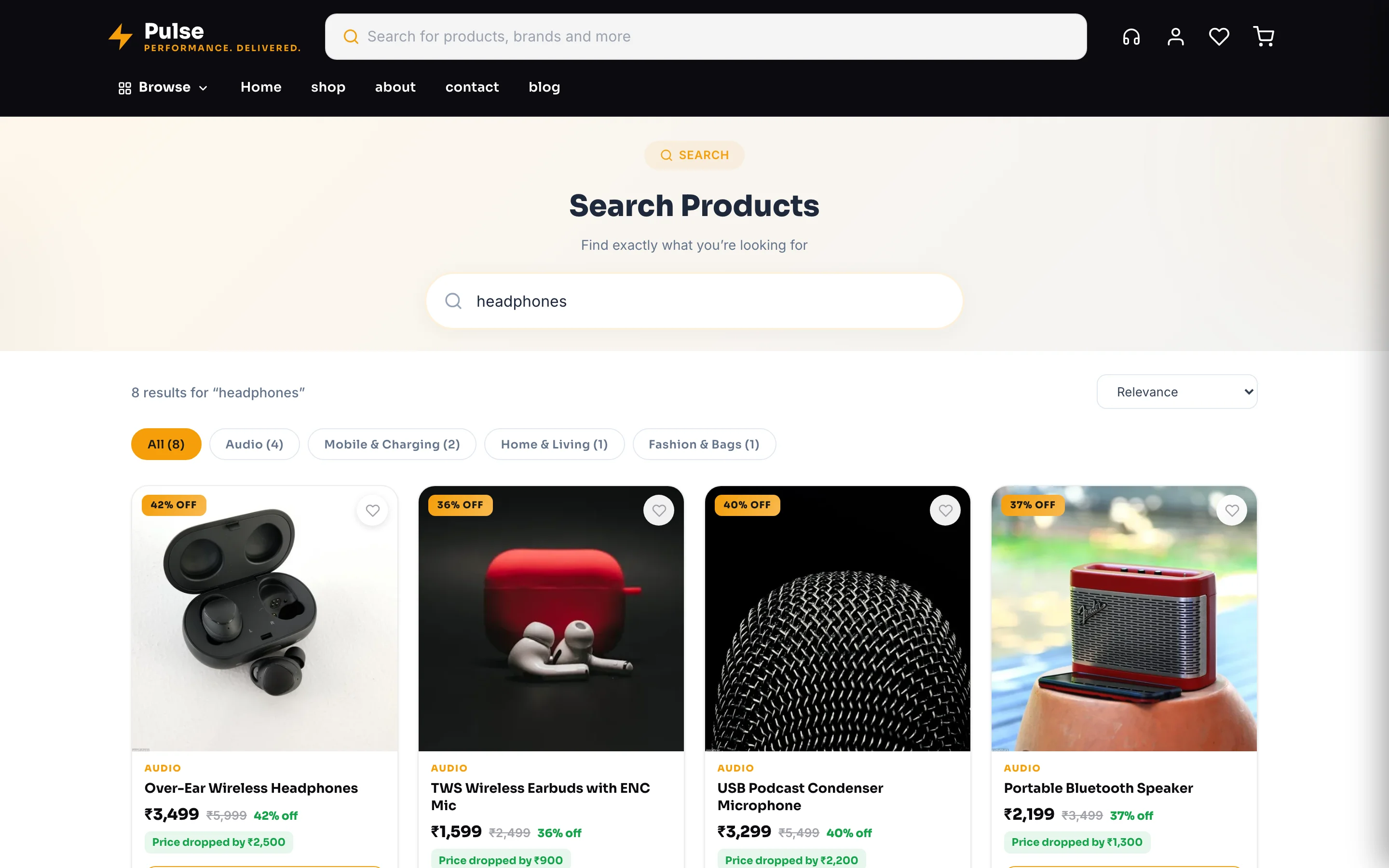
The results page is the same on every design, so it behaves predictably however your shop is styled: a big search box at the top, a live count of matches, a sort control (Relevance · Price: Low to High · Price: High to Low · Biggest Discount), category chips across the top to narrow the results, and the grid itself — two products per row on a phone, four on a laptop — each card carrying the heart that saves it. The pharmacy design (Arogya) shows its own product cards there instead: the Rx mark, the pack size, the price per tablet and the ADD button that turns into a counter.
On Canvas (Blank) designs the results page's title, the hint inside its search box and the two no-results lines are yours to word: Site Settings → Search Page in the editor. On the pharmacy design they sit in Site Settings → Header & Nav, beside the search bar's own words.
When nothing matches, the page says so plainly and offers a way back into the shop. That is the moment worth watching: it is the same customer who shows up as a red row in Search insights, and the fix is almost always one word rather than a new product. When search itself cannot answer for a moment (a slow connection, a busy server), the page never pretends there are no results — it says “Couldn’t load products” with a Try again button, and the same honest note sits under a long list of results when it cannot go any further. On a members-only shop a signed-out customer sees Sign in instead of an empty list.
The search box only helps if people can find it. Check the search icon is actually in your header — on a phone that single icon is often the difference between a lot of searches and none. You control it from Header & Footer.
Wishlist — the list they build for you
The heart icon on a product saves it to the customer's wishlist — the My Wishlist page, opened from the heart icon in your header. It needs no setting up and costs nothing, and it does two useful things: it keeps a hesitant shopper from losing the product, and it gives a returning customer somewhere to start. Saving does not need a sign-in.
| Behaviour | Detail |
|---|---|
| Where it lives | The heart on product cards and product pages; the list is the My Wishlist page behind the heart icon in your header (you can hide that icon per device under Appearance → Header icons) |
| Who it belongs to | The browser they saved it in. A second phone starts an empty list — it is a handy shelf, not an account feature |
| What it is not | Not a cart and not a hold: saving something does not reserve stock |
| What it tells your shop | When the customer is signed in, your shop also notes who saved what — that is what lets a price drop reach them |
| Its words | Open the Wishlist page in the editor: the empty-list title, the line under it, the button and where it goes (your shop, or any page you type), and the small badge at the top |
Telling savers when the price falls
If your shop is connected to the WhatsApp Business API, cutting a product's price can message the people who were waiting for exactly that. When you lower a price, the customers who saved that product while signed in — and anyone who left it sitting in a cart in the last 30 days — can get a WhatsApp saying it is cheaper now. You switch it on with the rest of your WhatsApp automations — the switch is called Price drop alert (cart or wishlist) — and you set the smallest drop worth announcing (5% by default) so a ₹2 rounding never becomes a message.
Two sensible guards are built in: nothing is sent for a product that is out of stock or whose price has since gone back up, and a customer who opted out of marketing messages is skipped. You still never see a list of who saved what — the alert goes out without handing you the names.
A wishlist tells you what people almost bought. If a product is saved often and sold rarely, the product is fine and something else — price, delivery cost, or photos — is stopping them. Your Analytics product funnel shows the same story from the other side.
Getting more out of both
Do this
- Read the “found nothing” list once a week — it takes five minutes
- Name products the way customers say them, not the way the invoice does
- Point seasonal words (“rakhi”, “diwali”) at your festival range for a few weeks
- Make sure the search icon actually shows in your header
- Drop a price on something people saved — if you use WhatsApp, they hear about it
Not this
- Assuming customers browse categories — most of them search
- Using only your trade's technical name for a product
- Ignoring a red row that appears thirty times a month
- Treating a wishlist save as a sale; it is an intention
Example · Deepak, a hardware shop in Nagpur
His top empty search was “drill machine” — thirty-four times in a month. He sells drills; he had listed them as “rotary hammer”. One spelling rule later, those thirty-four searches land on his ₹4,200 drill. Nothing was wrong with his shop except the word.
Related
| You want to… | Read |
|---|---|
| Fix the empty searches | Search insights |
| Name and organise products better | Add & edit products · Categories |
| Show or hide the search icon | Header & Footer |
| See where shoppers drop off | Analytics |
| Understand the customer account | Customer accounts |
Common questions
Do I have to set search up?
No. It indexes your products automatically and keeps itself current as you add and edit them. The only optional work is teaching it words specific to your trade.
Does search work in Hindi or Hinglish?
It already understands a large set of common Indian spellings and Hinglish words, and our AI adds each product’s Hindi or regional name in English letters. For anything specific to what you sell, add the word to the product’s Search words, or a spelling fix from Search Insights, and it applies from then on.
Does a spelling fix change my product names?
No. It only teaches the search box that two words mean the same thing. Your product names, category pages and menus are untouched.
Can I see who saved something to a wishlist?
Not as a list of names, and that is deliberate. The one thing your shop can do with it is send a price-drop message on your behalf (above). If you want to reach people who nearly bought and see their numbers, Abandoned carts is that page.
My Search Insights page is empty.
Either your website is new, or customers cannot find the search box. Check the search icon is showing in your header — on a phone it is often the difference between a lot of searches and none.
More in Products & orders
Did this answer your question?
It takes one tap and it genuinely changes what we write next.