
Build a services website — salon, clinic, gym, repairs & more
Every trade that sells trust and an appointment — salon, clinic, gym, repairs, hotel, travel agency, astrologer: the right design, your services and prices, bookings with an advance, and the five things to do on day one.
10 min readUpdated 22 Oct 2026
In this guide
Is this you?
If a customer's next step is to book you, visit you or ask you a question — rather than put something in a cart — this is your guide. That covers a wide set of trades:
Salon · spa · beauty parlour · bridal makeup · hair replacement and wig studio · hotel, resort and homestay · travel agency and tour operator · astrologer and pandit · clinic · doctor's chamber · dental clinic · physiotherapy · home nursing, patient-care attendants and elder care at home · medical equipment on rent · gym · yoga and fitness studio · personal trainer · photographer · wedding and event planner · AC, electrical, plumbing and appliance repair · handyman and AMC services · welding and fabrication workshop · gates, grills and railings · roofing sheets and sheds · auto garage · freelancer · design or marketing agency · architect · interior designer · builder · chartered accountant and tax consultant · NGO and charity.
Coaching classes, tuition centres and schools have their own guide — Build an education website — because admissions, batches and results need different pages.
Pick your design
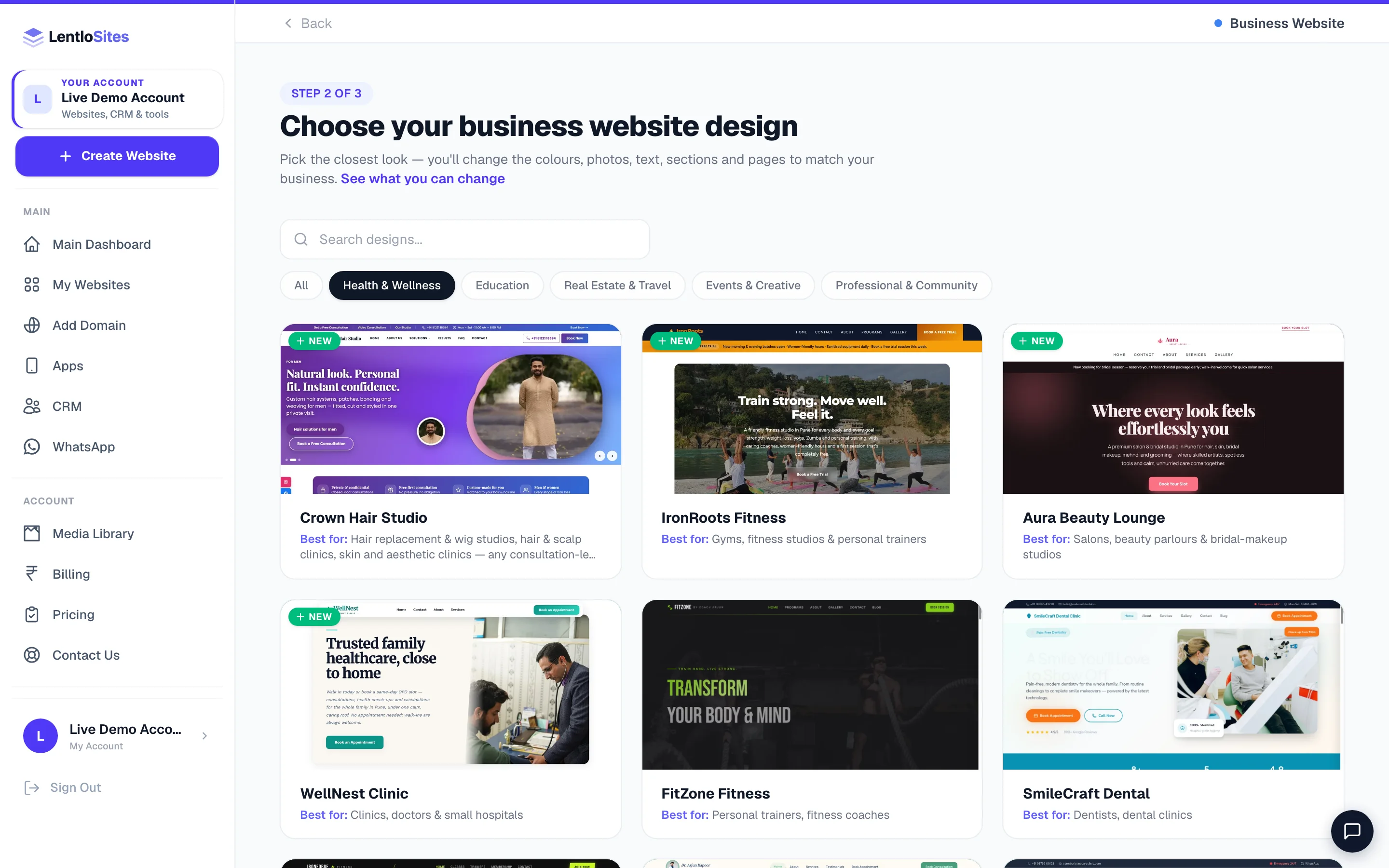
Everything here lives under the Business Website card at Create Website. Inside it, the newest designs — the presets — sit near the top of the All list, just after the few flagship designs the gallery floats to the front. Several presets do not appear under any sub-pill, so if you are hunting for one by name, stay on All or type it into the search box.
| Your trade | Start with | Why that one |
|---|---|---|
| Salon, spa, parlour, bridal makeup | Aura Beauty Lounge (preset) or Premium Salon | Service pricing cards, a before/after slider and a bridal section. The preset is block-built so you can rearrange it; the design is quicker to fill. |
| Hair replacement, wig studio, hair & scalp clinic, skin clinic | Crown Hair Studio (preset) | Built for consultation-led work: a Solutions menu with ten treatments, a consultation form, a before/after slider and a price guide. |
| Gym, fitness studio, personal trainer | IronRoots Fitness (preset), Premium Gym or FitZone Fitness | Class schedule table, membership pricing and trainer profiles. FitZone adds transformation photos and a nutrition section. |
| Clinic, doctor, small hospital | WellNest Clinic (preset), Premium Clinic or Premium Doctor | Doctor profiles, an OPD timetable, an appointment form and a 24/7 emergency band. Premium Doctor is for a single practitioner — it leads with credentials, takes appointments on the built-in booking page (patient age, gender and insurance go with the booking), and has room for your own videos: a film behind your photo, a one-minute introduction, a health-video library with its own Videos page, and patient video stories. Upload your videos in the editor; until you do, those sections stay hidden on your site. Its consultation price cards show your bookable services — the name, price, minutes and how the patient pays come from Bookings → Settings. |
| Surgeon, specialist, private practice | Vitals | The second doctor design: a dark, cinematic look with your film in a framed window, a moving heartbeat line, a fees board built from your bookable services, and the same pages as Premium Doctor (About, Services, Patient stories, Book, Videos, Contact). The content is the same set of boxes as Premium Doctor, so switching between the two keeps your words, photos and videos. |
| Dental clinic | SmileCraft Dental | A treatment pricing table and a before/after gallery — the two things dental patients look for before calling. |
| Home nursing, patient-care attendants (12 / 24 hours), elder care, physiotherapy at home, medical equipment on rent | Apnapan | Built around what a worried family asks: day, night and live-in shifts on a clock, a day of care hour by hour, how each caregiver is checked, updates for children living far away, care plans, an equipment list with rent and sale prices, a care-request form and a Careers page for hiring nurses and attendants. Call and WhatsApp sit one tap away on every phone screen. |
| The same home-care work in a second look: films, a care register and more movement (medical equipment optional) | Dekhrekh | Built around what a worried family asks, in the look of a home nurse's daily care register: a film beside a register page that writes itself, a "find the right care" picker where a family taps their situation, short films of care at home, day, night and live-in shifts on a duty roster, a family's story with its own film, a day of care hour by hour, a table comparing a trained caregiver with hiring on your own, how each caregiver is checked, updates for children living far away, a rate card, a map of the areas you serve, a care-request form and a Careers page for hiring nurses and attendants. A Medical Equipment page (rent, sale, or simply "we arrange it") starts switched off — turn it on in your pages if you offer equipment. Call and WhatsApp sit one tap away on every phone screen. |
| AC, electrical, plumbing, appliance repair, handyman, AMC | FixPoint Home Services (preset) | Written around jobs and visit charges rather than products, with the enquiry form on every page. |
| Welding and fabrication — gates, grills, railings, staircases, roofing sheets, sheds, shutters and repairs | Forge | Built for a workshop that is judged on its work: a welding-glow hero with your film, services on steel plates, your work videos sorted by the kind of job, an estimator that draws a customer's gate, grill, roof or railing to the size they type, a design book with codes they quote on WhatsApp, and a page to book a site visit. A materials shop is there to switch on if you also sell sheets, pipes or hardware. |
| Auto garage, car service | SpeedForce Auto Care | Service packages with prices, a brand showcase, a workshop gallery and a towing call-to-action. |
| Photographer, photo studio | Chhaya Studio (preset) or Eternal Moments | Big image showcases and a portfolio that is the point of the page. Eternal Moments is wedding-first, with an Indian-ceremony showcase and a budget calculator. |
| Wedding and event planner | Eternal Moments | Ceremony showcase, portfolio gallery and a budget calculator that starts the conversation. |
| Freelancer, designer, developer | Vikram Mehta — Freelancer Portfolio | Project showcase with filters, pricing packages and a work-process timeline. |
| Marketing or creative agency | Marketing Agency — Modern | A services grid, a four-step process, an industries-served block and testimonials that quote results. |
| Architect, interior designer, builder, contractor | Griha Studio (preset) or DesignBuild Studio | Project portfolios with filters, package pricing and a process timeline. DesignBuild adds a materials showcase, EMI section and a RERA badge. |
| Chartered accountant, tax consultant | Arthik Advisors (preset) | Written for ITR, GST, TDS and compliance work — services, deadlines and a consultation form, no shop anywhere. |
| Hotel, resort, heritage stay, homestay | The Grand Mahal Heritage Hotel or TripCraft | The Grand Mahal is enquiry-led: room pricing cards, curated experiences, a filterable gallery and WhatsApp. To sell rooms online with a rate calendar and instant confirmation, use TripCraft — see Travel booking websites. |
| Travel agency, tour operator, bus or taxi operator | WanderLux Travels, Safarnama Journeys (preset) or TripCraft | WanderLux and Safarnama take enquiries for trips you plan by hand. TripCraft sells bus seats, rooms, taxis and packages that customers book and pay for online — see Travel booking websites. |
| Astrologer, pandit, vastu or numerology consultant | Nakshatra or Pandit Shastri Ji | Nakshatra gives visitors free kundli, matching and panchang tools that bring you enquiries, and books paid consultations. Pandit Shastri Ji is a simpler look with puja pricing and a rashi grid. See Astrology websites. |
| NGO, charity, foundation | Asha Foundation | Impact statistics, campaign progress bars, volunteer sign-up and room for your 80G and FCRA details. |
| Boutique, tailor, bespoke stitching | Rangrez Atelier (preset) | Made-to-measure work is a consultation, not a cart — it starts with selling off and an enquiry form. Turn selling on later if you add ready pieces. |
| None of the above | Blank canvas — all-in-one | Build exactly the pages your trade needs. See Start from a blank canvas. |
Design or preset? Both are complete websites on day one. A preset is built from blocks, so you can reorder, delete and add sections freely and its header and footer are editable blocks too. A design is quicker to fill and often carries a bespoke section your trade wants. Open both live demos on your phone and pick the one you would be happy to send a customer today.
Keep these ready — it turns an hour into fifteen minutes
Your first hour, in five steps
- Business infoName, phone, address, hours
- Services & pricesThe page customers scroll to
- Bookings onSlots, and an advance if you want one
- Your real photosReplace every sample
- PublishThen share the link on WhatsApp
Fill Business Info once
Settings → Business Info. Your business name, phone, email and address are typed here once and appear across the header, footer, contact page, booking confirmations and your invoices — your WhatsApp number sits on the Social & Links tab next to it. Change the phone number here later and every one of those follows. Your opening hours go in the editor's Site Settings → Opening Hours, and the hours customers can book in Bookings → Settings → Weekly Schedule. Full tour: Site Settings.
Write your services with real prices
Open the editor (Edit Website) and fill the services section with what you actually do and what it actually costs — “Haircut ₹250”, “Root canal from ₹4,500”, “AC service ₹599 per unit”. A range is fine. A page that answers “how much?” gets called; a page that says price on request gets skipped for the one that answered.
Turn bookings on and set your slots
Open Bookings → Settings. Set your weekly availability, how long one appointment takes, how many you can handle in a slot, and your holidays. Then list your services with prices — the customer picks one while booking, and the booking records which service and price they chose. Full guide: Appointments & bookings.
Replace every sample photo and every sample name
Designs ship with sample people, sample reviews and sample photos so the page looks finished while you build. Replace them all before you share the link — a real customer reading a made-up testimonial with a stock face is the fastest way to lose them. The Grow page even flags leftover sample people for you.
Publish, then send the link to five regulars
Press Publish Website in the editor and your site is live on your free address. Send it to five customers you already know and ask them one question: “could you find our timings?” Their answer is worth more than a week of guessing. See Publish your site.
Bookings — and the advance that ends no-shows
Almost every design and preset in this guide arrives with a /book page already made — you do not create it, you fill it. (Marketing Agency — Modern, Apnapan and Dekhrekh are the exceptions: the agency takes enquiries through its contact form, and the two home-care designs through their care-request form; TripCraft books trips its own way.) Customers pick a service, a date and a time, confirm their mobile number with a one-time code, and the request lands in your Bookings inbox with a one-tap WhatsApp reply.
When no-shows start costing you a chair, a slot or a visit, ask for an advance. Open Bookings → Settings → Advance payment and pick How customers pay: Pay at the visit (nothing online), Full price online, or at the visit, Full price online to confirm, or Part now, the rest at the visit (a % or a fixed ₹). The Online payment switch under it says the same in three words — Off, Optional (they can pay to confirm instantly) or Required (the slot is held about 15 minutes while they pay) — and you can set a different advance for one expensive service without touching the rest. You need a payment gateway or a UPI ID in Settings → Payments first.
A bridal package with a 50% advance
- Package price
- ₹12,000
- Advance asked at booking (50%)
- ₹6,000
- Collected at the appointment
- ₹6,000
- What a no-show now costs you
- ₹0
- Regulars can be let off — tick “Ask only first-time customers”
- —
No payment gateway yet? Your UPI ID alone is enough — the customer scans your QR, uploads the screenshot, and the booking waits until you tap Money received. Nothing is confirmed without you.
Selling is off — until you want it
Every design and preset in this guide starts with online selling switched off, on purpose (Nakshatra, which can sell remedies, and TripCraft, which sells trips, have their own guides). No cart, no checkout, no Products or Orders cluttering your dashboard — because a salon is not a shop, and a menu full of things you never use is a menu you stop reading.
The day you do want to sell something — shampoo at the salon, supplements at the gym, a photo album, an AMC package — open Settings → Appearance → What this website does and switch on Sell products online. The shop, cart, checkout and the Products and Orders menus appear, and your bookings carry on exactly as before. Nothing you have built is disturbed.
Do not take bookings on the website at all? On the salon, clinic, dental, bakery, tuition and the other service designs, Site Settings → Enable Bookings switched off removes the booking page at the next Update Website and hides every “Book now” button that pointed to it. The What this website does card’s Bookings switch, where your site has it, decides first.
Take bookings somewhere else — Setmore, Clinicia, a WhatsApp link? Type that link into Site Settings → Online Booking Link (the bakery’s says Online Ordering Link) and every “Book now” / “Order now” button on the salon, clinic, doctor, dental, auto garage, catering and bakery designs opens it instead of the website’s own booking page. Leave it blank to keep the built-in booking page.
That switch belongs to the presets (and the blank canvas) — the ones marked “preset” in the table above, which are built from blocks. The fixed designs (Premium Salon, Premium Clinic, SmileCraft Dental, SpeedForce Auto Care and the rest) have no shop to switch on: they take enquiries and bookings. If selling is even a maybe, start on a preset — or take the odd payment by payment link.
If you chose Forge
Forge keeps each thing your workshop shows in one list in Site Settings, and the website puts it everywhere it belongs — you type it once:
- Your Services — each service has a Group (Gates & Grills, Roofing…). The home page shows them as steel plates, the Services menu shows them with photos, and the Services page groups them with a jump button for each group. A starting price shows only if you type one.
- Your Videos — short phone videos of your work (tall ones look best). Give each aCategory with the same words as a service group and it plays on the home page, on the Videos page under that tab and on the Services page under that group. A video in the category Tips goes to the Workshop Tips row instead.
- Design Book — your gate, grill and railing designs, each with a code like G-101. Customers tap Ask about this design and WhatsApp opens with the code and name already typed.
- Estimator — what a visitor can measure (grill, gate, roof, railing). It draws their size, works out the area and the bars or sheets. It shows a price range only when you type your own rates per square foot; leave the rates empty and it asks them to get the exact price on WhatsApp, with the size already in the message.
- Your Work and Your Clients — jobs you have finished, with photos from the site, and the clients you have permission to name. The Recent Work and Trusted By sections stay hidden until you add the first one.
- Colour Chart and Areas You Serve — the colours you offer and the neighbourhoods you work in (the areas sit on a moving radar around your workshop).
- A page for each video, job and service — every video gets its own page with the whole video and its sound, every job a page with all its photos large, and every service a page with its photos, videos and jobs. The cards link to them, and Google can show them when people search for that work (the website lists your videos for Google too). In Your Videos you can add what a video shows, the service it belongs to and the date of the job; a job takes up to eight photos. Switch any of the three off under Site Settings → Pages for each video, job and service.
The home page also carries eleven more sections. Tap one in the editor to change its words, its list and the colour band it sits on; its eye button hides it. Six of them start with sample words for a fabrication and roofing workshop — read them and change anything that is not true for your work.
- Roof Finder — a dial. The visitor taps what matters most to them (keep the heat out, let daylight in…) and the dial points to the sheet that fits, with its photo and a WhatsApp button. You set the choices and the sheet for each.
- How to Measure — a tab for each kind of job (gate, window grill, roof, staircase, shutter) with a drawing, its measuring lines and your steps. Its WhatsApp button sends the kind of job with blanks for the sizes.
- Compare Materials — your materials side by side, each scored 0 to 5 on four things you name, with a rough cost from ₹ to ₹₹₹₹. The best score in each column is marked. Score only what is true for the materials you fit.
- Layer by Layer — the steps every job goes through (cut, welded, ground, primer, paint, fitted), drawn as a stack of plates that opens as the visitor scrolls.
- Job Spotlight — one job told properly: all its photos, its facts, what the customer asked for and what you built. Type a job's title to choose it; leave it empty and it shows the job with the most photos.
- Photo Wall — the photos of your jobs as one big mosaic, each opening its job's page. It shows 4, 7, 14, 21 or 28 photos so the mosaic never has a gap.
- Repairs — the small jobs you also take, each with a WhatsApp button and a call button.
- Videos by Kind — your videos in tabs by their category. A tab needs two videos.
- Materials We Use — the brands you buy from, on steel nameplates. It stays hidden until you add a brand.
- In Numbers — counters that count what your website shows: jobs, videos, services, designs and areas. You can switch to your own figures — write only figures you can stand behind.
- Ask on WhatsApp — the questions people really ask you. Tapping one opens WhatsApp with the question already typed. It shows only when a WhatsApp number is saved.
The Shop page starts switched off, so a workshop that sells nothing never shows an empty shop. If you also sell materials, add your products, then switch the Shop page on in the editor's page list and press Update Website. The Book a Site Visit page is ready from day one — fill in the times you can visit.
What actually wins the enquiry
A service website is not judged on how modern it looks. It is judged on whether a stranger believes you will turn up, do the work and charge what you said.
Do this
- Photos of your real place, your real team and your real work
- Prices, or at least honest ranges — the single biggest cause of a phone call
- Your full address plus a Maps link, and the areas you serve, written in words
- Reviews from customers who actually exist, with their first name and area
- Your working hours, and what happens outside them
Not this
- Stock photos of a foreign clinic or salon — customers spot them instantly
- “Price on request” on everything; keep it for the genuinely custom jobs
- Sample testimonials left over from the design
- A contact form as the only way to reach you — put the phone number in the header
- Certifications or awards you cannot show
Example · Imran, an AC service business in Hyderabad
Imran listed three visit charges (inspection ₹299, service ₹599 per AC, gas filling from ₹2,200), his six service areas by name, and eight photos of his own team at work. He asked no advance for the first month, then switched on ₹200 Required after the fourth no-show in a week. Bookings dropped by about a tenth — and every remaining booking turned up.
After you are live
| You want to… | Read |
|---|---|
| Be found for “salon near me” | Get found on Google |
| Answer the same questions once | FAQ page |
| List more than one branch | Stores & Branches |
| Send appointment reminders | Customer notifications |
| Give your receptionist a login | Add team members |
| Bill for the work and keep books | Billing in the CRM · the CRM |
| Use your own .com | Connect your domain |
| Change your mind about the design | Which design is right for your business |
Common questions
I take walk-ins, not appointments. Do I still need the booking page?
No. Leave bookings off and the /book page stays out of your menus — the enquiry form and the WhatsApp button do the work. Many salons and garages run exactly that way and add bookings only when the phone becomes the bottleneck.
Can two of us take bookings on the same website?
Yes. Add your staff under Team & Staff — each person signs in with their own mobile number and sees only what you allow. If you have more than one branch, add them under Stores & Branches so customers pick the right one.
Do I need GST to run a services website?
No. A services website raises its bills in the CRM (free on every plan). If you are not registered, each bill is a Bill of Supply with no tax — a proper replacement for a paper bill book. If you are registered, fill your GSTIN once in the CRM's business profile and every bill becomes a tax invoice with GST worked out line by line. See Billing in the CRM.
How much does this cost to run?
Creating and publishing costs nothing. A services website has no per-sale fee because there are no sales — instead the Free plan charges ₹5 per enquiry from your credits (no enquiry, no charge), Starter ₹1, and Pro and Growth ₹0. Custom domain is free on every plan. See Billing & plans.
Can I add a blog?
Yes, and for a service business it is genuinely useful — “how often should an AC be serviced?” is a question people type into Google. Posts are on by default; see Publishing blog posts.
More in For your kind of business
Did this answer your question?
It takes one tap and it genuinely changes what we write next.