
Restaurant Insights — your whole restaurant on one screen
Six tabs: sales, menu, customers, channels & payments, tables & bookings, and who nearly ordered. Every number from your real orders.
5 min readUpdated 21 Oct 2026
In this guide
The strip that never changes
Whatever tab you are on, the top of the page holds revenue, orders, average order value and customers — each with an arrow comparing it against the period just before. Beside them sit quick chips (discounts given, delivery fees, money still to collect, cancellations) and a short line of what we noticed, written in plain words rather than percentages.
Every figure here is counted from your real orders — website, table QR, counter and phone orders alike, with cancelled, returned and returned-to-shop orders left out, by the Indian calendar day. These are the same orders you see on your Orders page, which is why it is safe to make decisions on.
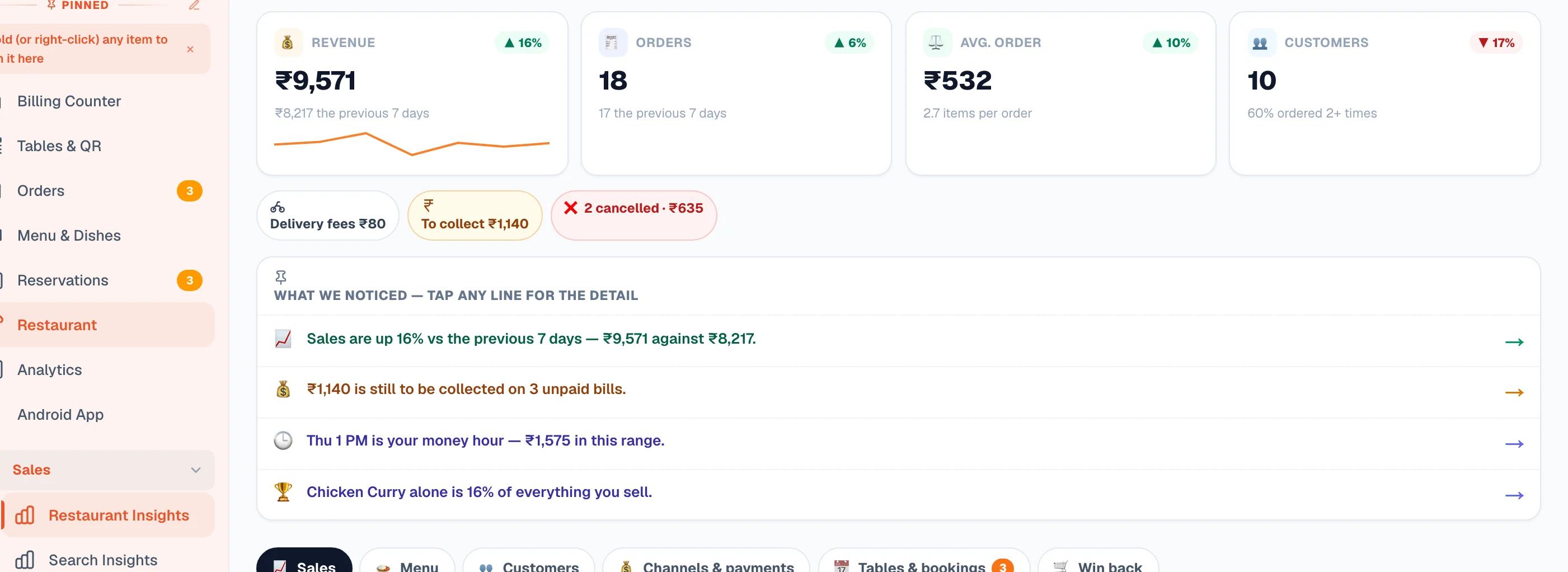
The six tabs, and the question each answers
| Tab | The question it answers |
|---|---|
| 📈 Sales | When does money come in? A revenue-and-orders chart you can touch for any point (hour by hour on a single day) plus a busy-hours heatmap. |
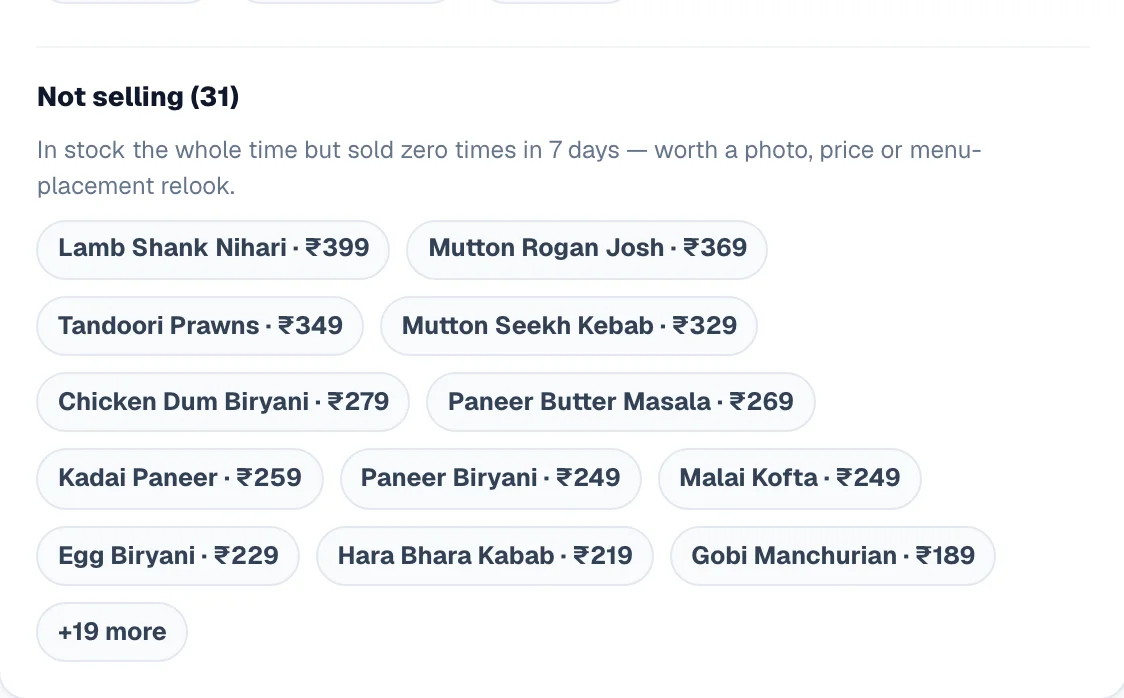
| 🍛 Menu | What sells, and when? Best sellers with a when-each-dish-sells bar, the category mix, the veg/non-veg split — and Not selling: dishes that sold zero times in the period. |
| 👥 Customers | Are they coming back? First-time versus returning, your repeat rate, average spend, and your top customers with a one-tap call. |
| 💰 Channels & payments | Which way of serving earns? Dine-in, takeaway and delivery with their own average order values, delivery fees and top pincodes, the counter / table-QR / website split, the payment mix, and money still to collect. |
| 📅 Tables & bookings | Are the tables working? Per-table performance, reservations confirmed, pending and cancelled, guests expected, the most-requested times, and a Coming up list for the next seven days. |
| 🛒 Win back | Who nearly ordered? People who reached checkout and did not finish, including failed payments, with a one-tap jump to recover them on WhatsApp. |
On a computer the whole report lays out on one wide screen with the pills jumping to each part; on a phone the six tabs keep it light.
Three decisions worth taking from it
Reading it honestly
Do this
- Compare like with like — a Saturday against last Saturday, not against Tuesday
- Read Channels per outlet when you run more than one
- Act on the Not-selling list once a month, not once a year
- Work the Win back list the same evening — a cold cart is a lost cart
- Check the payment mix before deciding customers “only pay cash”
Not this
- Judging a new dish on three days
- Treating cancelled orders as lost revenue — they were never counted
- Cutting a dish that sells rarely but sells at a high margin
- Reading a festival week as your normal week
Example · A family restaurant in Pune
The Menu tab showed eleven dishes with zero orders in thirty days — most of them a Chinese section added years ago. They cut nine, kept two that regulars ask for, and moved the freed prep to a lunch thali. The heatmap then told them their weakest slot was 3–6pm, so the thali offer was aimed there rather than at the evening rush that never needed help.
Related
| You want to… | Read |
|---|---|
| Run ordering, hours and menu timings | Restaurant mode |
| Bill at the counter and print kitchen tickets | Billing Counter |
| Recover the carts on the Win back tab | Abandoned carts |
| See visitors as well as orders | Analytics |
| Download the figures for your accountant | Reports & exports |
Common questions
Why do these numbers differ from a delivery app's dashboard?
Because these are only your orders — website, table QR, counter and phone. Orders that came through an outside app were never yours to count here.
Do counter bills show up in Insights?
Yes. Counter sales are orders like any other and appear in revenue, the menu mix and the channel split — the Channels tab is where you see the counter share against table QR and website.
Which team members can open Insights?
You, anyone you have made a manager, and any team member who has Restaurant controls switched on — the same permission that lets them pause the kitchen and manage tables. It is a money screen (revenue, average order, money still to collect), so if a staff member should not see your sales figures, leave Restaurant controls off for them and give Food orders & billing instead (it runs the counter, the kitchen and the table board, but not this screen) — see Add team members. A staff member pinned to one outlet sees only that outlet's numbers.
It says a table earns very little. Is the table the problem?
Usually not — a two-seater near the door will always trail a corner six-seater. Compare tables of the same size, and read it alongside how often each one turns.
Is there anything here I cannot get from Analytics?
Yes — the dine-in half. Table performance, reservations, the counter/QR/website split and the veg/non-veg menu mix exist only here. Analytics covers visitors and traffic, which this page does not.
More in For your kind of business
Did this answer your question?
It takes one tap and it genuinely changes what we write next.