
Build an online shop — kirana, boutique, jewellery, electronics & more
Every store design runs the same cart and checkout; what differs is the shopfront. Pick yours, add one product properly, and be taking orders in an hour.
10 min readUpdated 21 Oct 2026
In this guide
Is this you?
You have things with prices, and you want people to buy them without calling you. Kirana and grocery · supermarket · clothing and boutique · ethnic and bridal wear · jewellery · electronics and mobiles · auto parts · pharmacy and medical store · pet shop · home décor and furniture · ayurveda, herbal and beauty · stationery, toys and gifts · any D2C brand · or a value store with thousands of items.
Selling food you cook? That is a food business. Showing a range and quoting on WhatsApp rather than taking payment? That is a catalogue. Selling to the highest bidder? See Auctions.
Pick your design
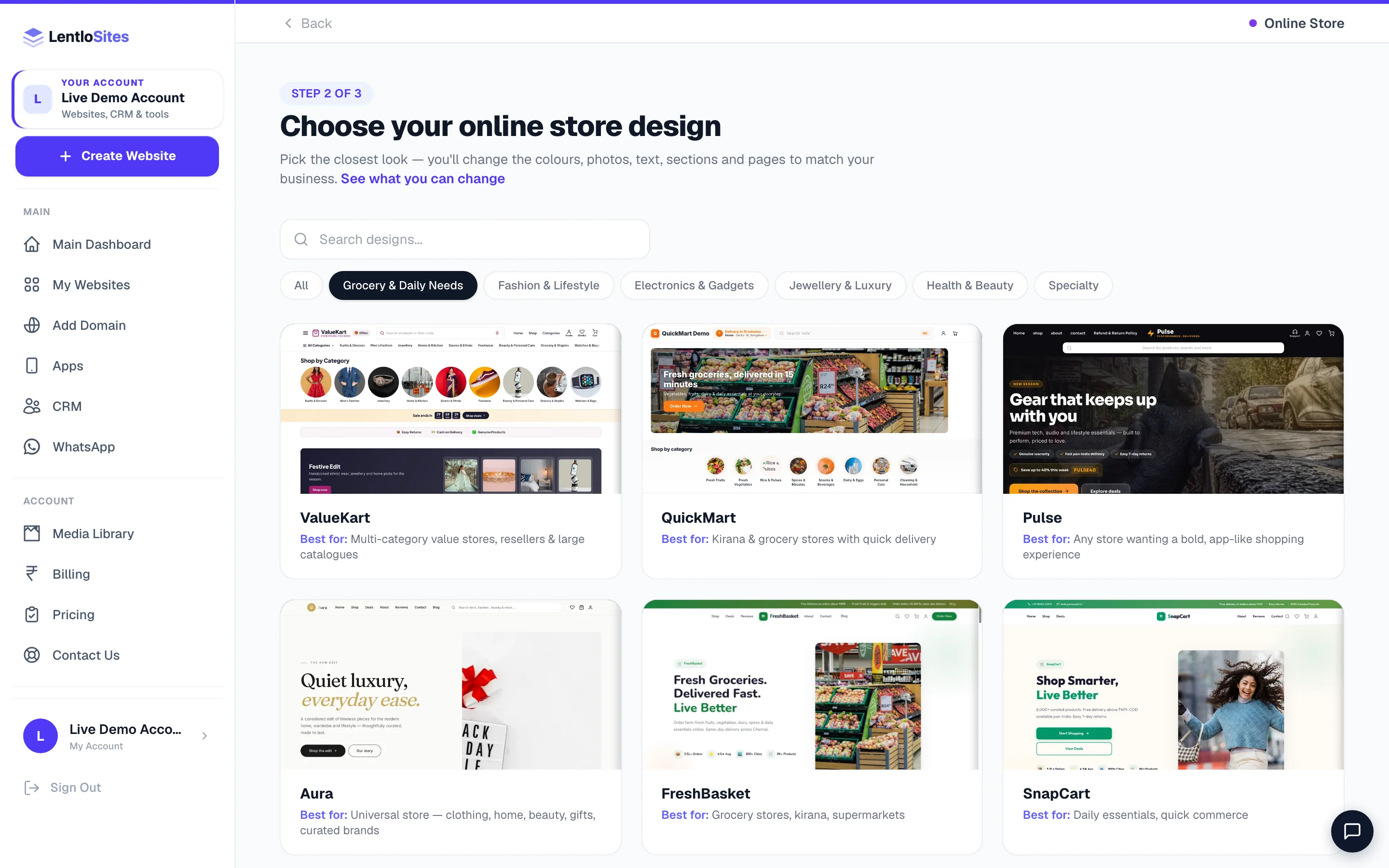
All of these live under the E-commerce card at Create Website, with sub-pills for Grocery & Daily Needs, Fashion & Lifestyle, Electronics & Gadgets, Jewellery & Luxury, Health & Beauty and Specialty. Pick the closest shopfront rather than the perfect one — the colours, photos, words, sections and pages all change afterwards. The Can't see your look? card at the end of the grid explains the three ways to get there; see Create your website.
| Your shop | Start with | Why that one |
|---|---|---|
| Kirana, grocery, daily needs, quick delivery | QuickMart or FreshBasket | QuickMart is the Instamart-style layout — sticky search (type your own Rotating search words in Site Settings and the search box cycles through them: Search ‘milk’, Search ‘atta’…), +/− counters on the cards, cart-only (no Buy Now), and homepage rows you curate. FreshBasket is the softer farm-fresh look. |
| Supermarket or department store with many departments | MegaMart | A three-tier mega navigation, flash deals with timers and a dedicated deals page — built for a wide catalogue. |
| Boutique, ethnic and bridal wear | Vastra Boutique or DesiKart | Handcrafted and bridal collections up front; DesiKart adds combo offers, product drops and a customer-photo gallery. |
| Sarees, dhotis and veshtis, silks, handloom, towels and pooja textiles — any traditional textile store | Zari | A traditional textile house: every band of the page is edged with a woven zari border in the motif you pick (temple, mayilkan, rudraksha, checks, mango or plain) in Site Settings → Colors & Fonts. The home page opens on a loom — your photo between two slowly moving borders, with an optional silent film — then shop by category, shop by border, shop by occasion and a size guide drawn to scale: saree lengths (5.5 m on its own, 6.3 m with a blouse piece), dhoti sets in mulam (9 × 5, 10 × 6) and readymade sizes, each card naming its own pieces. Products with a size choice show the same guide on their page (Site Settings → Size Guide). Product photos are tall (4:5) for photos of people wearing the cloth; choose Square for folded cloth shot flat (Site Settings → Product Card Labels and Product Page Labels). Bulk, wedding and temple orders are set in one place (Site Settings → Bulk & Temple Orders): a Bulk orders button in the header, a band on the home page, an invitation above the footer, a card on every product page and a full Bulk Orders page whose request form arrives in your Leads. Know-your-fabric cards, a featured pooja collection with lit lamps, video reels and product videos complete it. |
| A clothing store with a wide range — sarees and suits, menswear, kids, wedding wear, bags and footwear, new or pre-loved | Rail & Tag | The home page opens like a lit shop window: your photo or film in a frame, your newest pieces gliding past on film strips, and a tailor’s tape carrying your categories. New pieces hang on a rail that sways as shoppers scroll, and prices sit on kraft swing tags. Short silent films can play over the main photo, the edit banners and the story, and any product can carry its own film — each film waits until the page has loaded or the shopper scrolls to it, and visitors on data saver keep the photo. The home page shops by category, and you can add shop by size, shop by budget, video reels and a lookbook. Every product page shows the size, the measurements and the condition, a piece with one left says so, and sold pieces stay on view in a “Found a home” row. |
| Fashion, clothing, accessories | Atelier Noor or TrendFlow | Atelier Noor is editorial — a lookbook and a size guide. TrendFlow is the youth-brand version with Shop the Look and flash deals. |
| Streetwear, urban lifestyle, grooming | StyleHive | Search-first navigation with the deal countdown and coupons that this audience expects. |
| Jewellery you sell online at fixed prices | Shri Kanakam Jewellers | A fine-jewellery look, bridal collections and a craftsmanship story. (Prices that change with the metal rate every morning? That is the catalogue instead.) |
| Electronics, mobiles, multi-category | MarketPulse or Gadget Zone | MarketPulse handles many categories and big lists; Gadget Zone leads with a hero slideshow, a trust strip and combo offers. |
| Tech and gaming, dark premium look | VoltMart | Dark glassmorphism with a floating nav and its own loyalty coins. |
| Licensed pharmacy, medical store | Arogya | The pharmacy design: every medicine marked by prescription, your pharmacist checks the prescription before an order is sent, stock by batch and expiry, and a private page where customers send their prescription. See Pharmacy websites. |
| Health and wellness store (vitamins, personal care) | MedPlus Pharmacy | A health-store look with prescription-upload and pharmacist trust cues on the page — without the prescription check or the Pharmacy Desk. |
| Pet shop | PawPals Pet Store | Grooming booking and vet consultation sit beside the shop. |
| Home décor, furniture, kitchen | ShopNest | Nested category navigation for rooms and sub-categories. |
| Ayurveda, herbal, skincare, beauty | Veda | Warm ivory editorial with a Browse mega-menu built from your own categories — quiet, not flashy. |
| Ayurveda or herbal wellness where customers ask before they buy | Amrit | Consultation is built in: its own Consultation page (WhatsApp chat, video call, phone and a short request form whose answers arrive in your Leads), a Consult button in the header, a consultation band on the home page and above the footer, and a consultation card on every product page — all set in one place. Mark the products that need a consultation and they wear a “Consult first” tag. A heritage-style header: on computers the logo sits in the centre with your tagline to its left and the menu on its own line under a fine gold rule (or pick logo-left in Site Settings → Header & Nav, where the bottom edge — double gold line with a diamond, scalloped, thin line or soft shadow — is also chosen). Once a shopper scrolls, the logo line folds away and one slim bar stays at the top with your logo, the menu, Consult and the cart; scrolling back up brings the full header back (switch Slim header while scrolling off to keep the whole header on screen). It shows a wide logo well: upload a horizontal logo and no separate name text is needed. The two moving strips run slower on phones than on computers, and each has its own speed setting. A grand opening with three arched windows and a film, shop by concern, real review ratings on cards and full-width product photos on phones. Product videos do the selling: add a video to a product and it appears among that product’s photos, joins the “Watch & shop” video rows on the home page, the shop page and other product pages (each with the product’s name, price and an add-to-cart button), and — if you switch it on in Site Settings → Product Card Labels — plays silently on the product’s card. Every short point (under the hero, in How it works, the consultation band, Why shop with us and the row above the footer links) gets a small line drawing picked from its words — or choose the drawing yourself under Picture on that point. |
| Considered purchases (hearing aids, medical devices) | HearWell | A trust band, shop-by-type cards and a four-step “delivered and fitted at home” timeline — for things people research before buying. |
| Anything, with an app-like feel | Pulse | Cinematic dark header with full-width search, hero slideshow, bold cards with Add to Cart and Buy Now. |
| Many kinds of product in one shop — gadgets, home and kitchen, beauty, fashion, toys, food and gifts — shown with films | Showreel | A film-studio look for an all-products store. The home page opens in a camera viewfinder: your photo or a short silent film, a running timecode, focus brackets and your products taking turns in a caption bar (or pick the Edit suite or Film poster look, or your own banner slider, in the Hero section). Categories sit on a photographer’s contact sheet with the first one circled in red pencil, one product turns on a lit turntable, scene banners play short films behind clapperboards that snap shut as they scroll in, product videos fill a “Watch & shop” row with quick add to cart, your brands roll up like film credits and a deal counts down on a big slate (it shows only once you set the deal time). Shop by budget, shop the scene and Instagram photos appear once you add them. Every section’s small “Scene 02” label can be switched off in Site Settings → Colors & Fonts. |
| A very large or multi-category value catalogue | ValueKart | App-like mobile shell with a bottom tab bar, bottom-sheet filters built automatically from your catalogue, and an endless two-up feed. |
| Curated, editorial, mixed range | Aura | Generous whitespace and warm-gold accents — a brand look rather than a bazaar look. |
| Traditional Indian store, budget-first, referral-led | BazaarNow | Social-commerce design with a share-and-refer programme and COD front and centre. |
| Luxury or premium brand | LuxeKart | Dark luxury look, bento hero, flash sale countdown and bank offers. |
| Auction house, collectibles, antiques — or a scrap yard, surplus and used-machinery dealer | Hammer or Yard | Both run timed auctions with live bidding beside fixed-price items: Hammer is an auction-house look for lots you own, Yard is for consignment — sellers send a request from the Sell page and you list the lot. See Auctions and Yard. |
| Not sure yet, general purpose | ShopVista, CartWave or SnapCart | Straightforward stores that do everything without a strong opinion. SnapCart leans daily-essentials. |
Selling 250 products or more? Read this first
Past roughly 250 products a shop starts to feel different: endless scrolling, a flood of images, and filters that only see the part of the list already loaded. Ten designs carry the engine built for that — chunked loading, images that wait until they are needed, and search and filters that run across your whole catalogue rather than the visible page:
Pulse · Veda · Amrit · Zari · Rail & Tag · Showreel · HearWell · ValueKart · QuickMart · MarketPulse.
Under 250 products this makes no practical difference — pick on looks. Above it, starting on one of these ten saves you a migration later. ValueKart is the one purpose-built for the biggest catalogues: it derives its filter set from your own products.
The category mega-menu. Once you nest categories into a tree, most store designs grow a category menu bar across the top automatically. Four draw their own instead — Pulse, HearWell, ValueKart and Zari — so you will not see the injected one there, and you do not need it. On Zari your categories ARE the main menu on computers, each opening its sub-categories; to show your pages there instead, choose it in Site Settings → Header & Nav → Main menu on computers. Details in Categories & shop organisation.
Keep these ready
Your first hour, in five steps
- Business infoName, phone, address
- Add one productProperly, not five badly
- Take moneyUPI ID and COD
- Delivery chargeOne rate, one free-above amount
- Publish and test-buyOrder from your own shop once
Fill Business Info once
Settings → Business Info — business name, phone, email, address and logo (your WhatsApp number is on the Social & Links tab next to it). It flows into your header, footer, contact page, order messages and invoices at once. See Site Settings.
Add one product completely
Name, price, MRP (so the strike-through and discount show), one clean photo, a category and stock. That one product teaches you the form; the rest go faster, and you can paste a link from another site or upload a spreadsheet later. See Add & edit products and Import products.
Turn on a way to be paid
Settings → Payments. Your UPI ID alone works from minute one — customers scan, pay and upload the screenshot, you confirm. Add a gateway when you want payments confirmed for you. Keep Cash on Delivery on for your first weeks; it is how most first orders happen in India. See Accept payments.
Set one delivery charge
Shipping → a flat charge and a free-above amount. That is enough to open. Pincode zones, weight slabs and courier partners are all there when you need them — Delivery charges & shipping.
Publish, then buy from your own shop
Place one real order on your own website — through checkout, on your phone. It is the fastest way to find the one thing you forgot, and it takes two minutes. Cancel it afterwards and the stock comes back.
What a sale actually costs you
There is no monthly fee to open and no charge for listing products. On the Free plan the platform takes 2.5% of each online sale from your credits — and nothing at all when you do not sell. Starter is 1.2%; Pro and Growth are 0%, so you keep the whole sale. Your payment gateway charges its own fee separately, as it always would.
₹1,000 of products, plus ₹60 delivery, on the Free plan
- Customer pays (₹1,000 products + ₹60 delivery)
- ₹1,060
- Platform fee on the sale (2.5% on Free)
- − ₹25
- You keep
- ₹1,035
- The fee is on the products' price after any discount — never on delivery or COD charges
- —
- Taken from your Lentlo Credits after the sale — never added to the customer's bill
- —
Orders you type in yourself for a phone, WhatsApp or counter sale carry no platform fee — only orders your customers place on the website do, and a cancelled one refunds its fee automatically. Exact numbers for every plan are in Billing & plans.
Set your free-delivery amount just above your average bill. If people usually spend ₹450, free delivery above ₹499 lifts the basket. Free above ₹300 simply gives away the delivery you were already being paid for. Set it in Shipping — your product pages and checkout show the same amount.
What makes a stranger press Place Order
Do this
- One clear photo per product on a plain background — square framing
- MRP filled in, so the discount is visible and honest
- Cash on Delivery for the first weeks, then Partial COD if parcels get refused
- Delivery time in real days, by area — “2–4 days in Maharashtra, 5–7 elsewhere”
- A phone number in the header that somebody actually answers
Not this
- WhatsApp-forwarded photos — they arrive already crushed
- “Best price”, “100% original” and other claims a stranger cannot check
- A shop with three products and eight category tiles
- Turning COD off before you have any reviews
- Leaving sample products from the design live alongside your own
Example · Rakesh, a kirana store in Indore
Rakesh opened with 40 products, UPI plus COD, ₹40 delivery free above ₹499 — and a WhatsApp status with the link. His first month was 62 orders, of which 9 COD parcels came back refused. He switched on Partial COD at ₹100 up front; refusals dropped to one the following month, and the ₹100 covered the delivery on each of those anyway.
After you are live
| You want to… | Read |
|---|---|
| Run the day's orders | Managing orders |
| Keep stock honest | Stock & inventory |
| Organise a growing catalogue | Categories |
| Book couriers and print labels | Shipping · Address labels |
| Bring people back | Loyalty points · Coupons · Abandoned carts |
| Sell on Google and Instagram | Sell on Google · Instagram & WhatsApp |
| Raise GST bills and keep books | GST invoices · Books & Tax |
| Give your packing person a login | Add team members |
Common questions
Do the different store designs sell differently?
No. Cart, checkout, payments, delivery, coupons, loyalty, invoices and orders are the same engine on every store design. The design changes the shopfront — the layout, the navigation, how a big catalogue is browsed — not what happens when someone buys.
I have 2,000 products. Will my shop be slow?
Not on the ten designs built for it — Pulse, Veda, Amrit, Zari, Rail & Tag, Showreel, HearWell, ValueKart, QuickMart and MarketPulse — which load in chunks and search across the whole catalogue. On other designs a very large catalogue is heavier to browse, so start on one of those ten if you already know your range is big.
Can I sell services or bookings from a store design?
Yes — bookings sit alongside a shop rather than needing a second website. Several store designs already ship a Book page (PawPals Pet Store, Shri Kanakam Jewellers and MedPlus Pharmacy among them), and the Bookings desk in your dashboard works the same on every design. If yours has no booking page, the blank canvas has selling and bookings as two switches. See Appointments & bookings.
Do I need GST to open a shop?
No. Without a GSTIN your bills print as a clean Cash Memo with no tax columns. Add your GSTIN whenever you register and every bill becomes a proper tax invoice. See GST invoices.
What if I want auctions instead of fixed prices?
Any store can run auctions on a per-product basis — switch a product to Auction and it takes bids instead of going into the cart. Two designs are built around it. See Auctions.
More in For your kind of business
Did this answer your question?
It takes one tap and it genuinely changes what we write next.